


WAVLINK DisplayLink Laptop Docking Station – Quad Monitor 5K/4K@60Hz, 100W Charging – Thunderbolt 4/3, USB-C/A – M1 M2 Mac/Windows/Chrome/Ubuntu – 4 HDMI, 4 DP, 180W Power, SD 4.0 CR, 2.5Gbps LAN
$199.86




From the brand


Expanding Your Viewing
Improve Home Network
Improve Your Productivity
Effortless Multitasking
USB C Dock
Thunderbolt 3 Dock
Universal Video Adapter
USB C HUB
Hard Drive Docking Station
SATA Adapter

Found in 2003, WAVLINK owns the expertise in comprehensive IT peripherals as well as being a worldwide leading manufacturer. Design, develop, and manufacturing all its product. As one of the only true designers & manufacturers in the industry, WAVLINKoffers high quality design products backed by the service and support that consumer demand.The company distributes products throughout North and South America, Europe, Asia-Pacific.
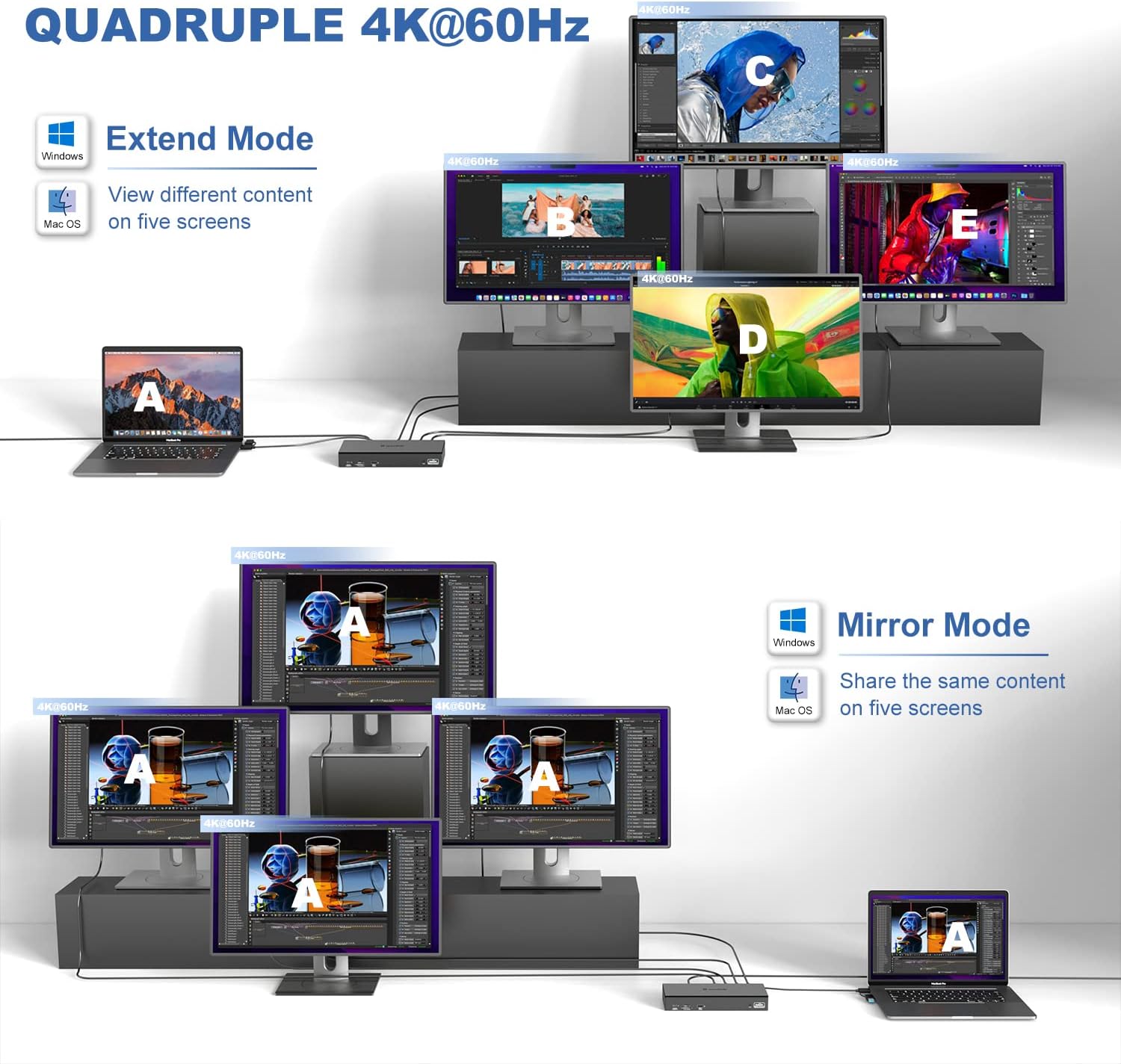
Experience Immersive Work and Entertainment: With support for quadruple monitors at 5K/4K@60Hz resolution, this docking station offers an unparalleled visual experience that is perfect for multitasking or streaming.
Quadruple Monitor Support: The maximum resolution will be 5120x1440p60 (5K UItrawide) or 4096x2160p60 (Cinema 4K) if quad DisplayPort video outputs for quad monitors. Quad Display (HDMI/HDMI+DisplayPort ) resolution up to 3840×2160@60Hz or 4096×2160@60Hz (Cinema 4K). This docking station provides an immersive visual experience that is perfect for professional multitasking or entertainment purposes.
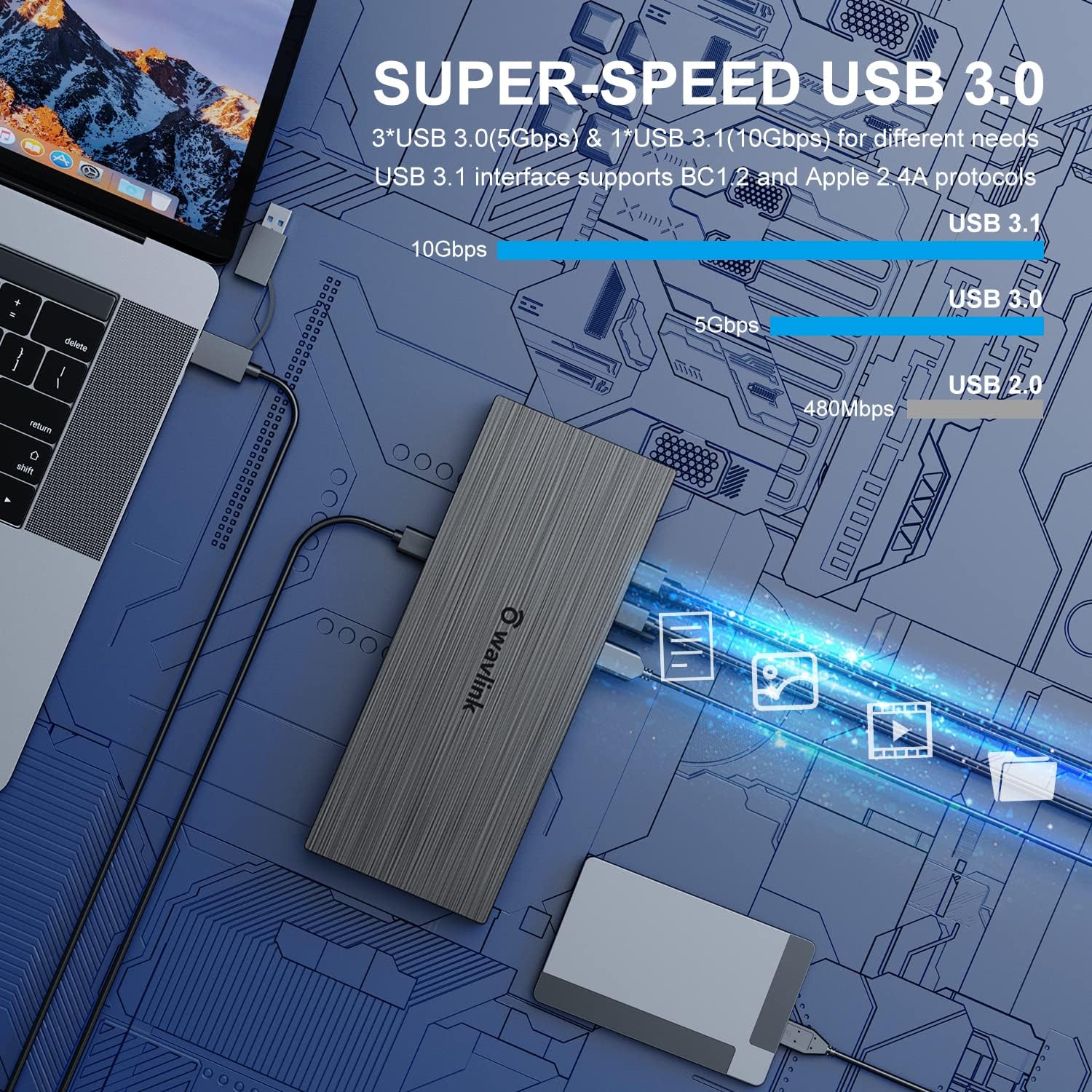
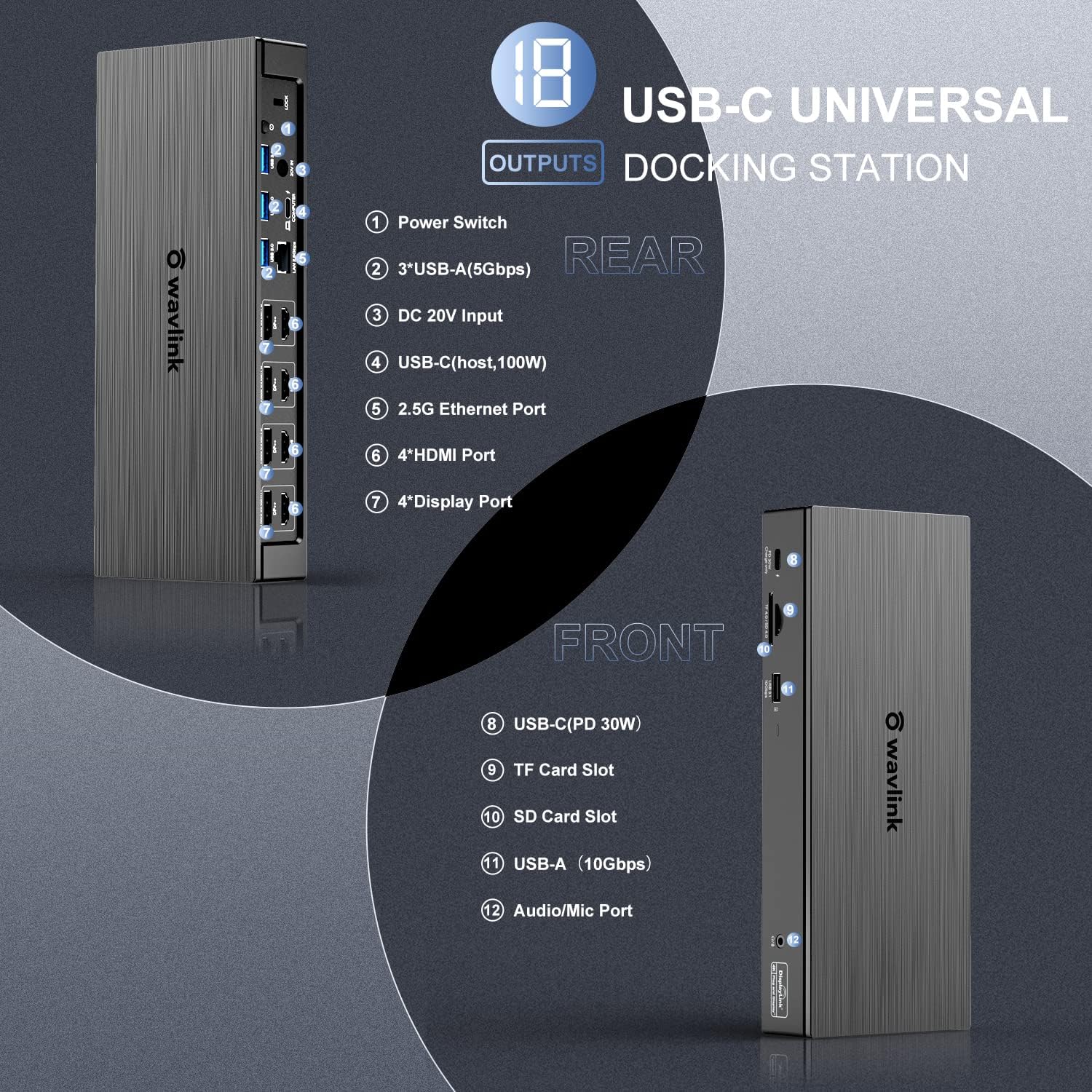
Lightning-Fast Data Transfer and Charging: Equipped with a 2.5Gbps Ethernet and SD 4.0 card reader, as well as a powerful 100W host charging capability, so you can transfer large files quickly and charge your laptop fast.
Comprehensive Compatibility: The WAVLINK Universal USB C Docking Station is compatible with Thunderbolt 3 and 4, USB-C Windows and Mac devices, allowing for seamless integration into your existing setup.
What you get:1 x USB-C Quad 4K Dock, 1 x 2-in-1 USB-C to USB A/C cable, 1x DC20V/9A 180W power adapter, 1 x AC power cable, 1x Cable holder, 1x CD-shaped Driver Download Links, 1 x Quick start guide. 18 months worry-free warranty and life-long friendly customer service and technical support.
3 reviews for WAVLINK DisplayLink Laptop Docking Station – Quad Monitor 5K/4K@60Hz, 100W Charging – Thunderbolt 4/3, USB-C/A – M1 M2 Mac/Windows/Chrome/Ubuntu – 4 HDMI, 4 DP, 180W Power, SD 4.0 CR, 2.5Gbps LAN





CAH || –
I had some doubts but I gotta say…
To address the rating system before me, to choose from:>Overall Rating— I give it 5 stars (I’ll explain).>Tech Support — I choose “Not Rated” – None necessary (see “Overall Rating” above).>Value For Money- I give it 4 stars (I’ll explain)>Sleep Mode ——- I choose “Not Rated” (if someone can explain w t f “Sleep” is, I could rate it)I was skeptical to use this as I expected failure.I’m running a DELL laptop with,1 LAN2 USB 2.01 USB 3.01 HDMI1 Audio OutAnd the usual Micro Card reader/writterI have 2 identical, 24 ” LED Acer monitors, each with,1 DVI port1 VGA portThe following is how I have two monitors running successfully , IN CONJUNCTION WITH, a laptop, a secondary [cabled], keyboard and a Bluetooth mouse [Logitech mouse, old DELL kbd]:This “Box” is connected to the Laptop by a true, USB 3.0 cable toUSB 3.0 (Port 1)Secondary Keyboard –> USB 3.0 (Port 2)Monitor 1 –> DVI to HDMI [F] Converter –>> HDMI to HDMI (Single port) cable.Monitor 2 –> DVI to DVI (Single port)Therefore, the “Box” has available;2 USB 2.01 USB 3.02 USB Charging Ports1 LAN1 Audio/IN1 Audio/OUTTherefore, the DELL Laptop has available;1 HDMI1 LAN1 USB 2.0*Audio/OUT is connected to external speaker*USB 2.0 Is occupied by Bluetooth/(mouse) transmitter.*I’ll be adding a 3rd, identical monitor to the equation – theoretically, in the HDMI port, on the DELL Laptop.During this very hectic time these monitors were able to show the vibrant, crimson, bleeding of the digital chart pixalization.The “Box” has been running nonstop since I got it and set it up – maybe a week after receiving it.It performed quite well in keeping the video connections almost pure.You could almost smell the copper from the blood my portfolio leaked for two weeks.But those red pixels…?? Man !!I use LED grow lights, but Jesus, Marie- when the monitors, connected to a “Box”, connected to a laptop, connected to a speaker blazing “Forty Six & 2” on YouTube, while the monitors keep clones going for two weeks…??!!THAT, is an impressive BOX !!I didn’t need technical support per se, but I needed mental support since Pink Floyd only helped curtail the monster for so long.I was told that “This was an outside issue”.Having been a Tech, a Team Leader, and then Floor Manager in a top 3 computer company, before support was EXported to a country you can’t pronounce, where people had the commanding understanding of the English words… “Please hold”, and “Try plugging it in”, while dealing with FRAUD PREVENTION… I understood that my dilemma TRULY wasn’t their responsibility.So I never REally called them because I never REally needed them so I didn’t REally feel that it was fair to rate that which was not REally needed.It makes sense in my head (Shut up, he’s typing. Don’t tell him to shut up).As far as, “Value for the money”, and the 4 Stars I gave it;It’s a BOX.I’m not sure if it was designed this way but if you place the “Box” by instinct, with the cables in the back, then you are doing it wrong or there is a better way.Which then begs the questions as to placement of ports v. placement of bright-blinky lights v. “Box” orientation.It seems that standing the “Box”, with the cables on the top, is a better situation.Putting the stack of cables just behind a monitor (on stands before mounting on a latis – the walls need new, greed bleed), allows for the hiding of the cable stack but keeping the pretty lights in sight, just under the frame.I say go for it.If you got the bread to spend and the need to juggle chaos in a manageable and recognizable form of insanity, who am I to discourage you.But remember, once you taste the Dark Side, you’ll need another shot in the morning… at exactly 9:30 AM, NYSE-ST.Just don’t leave it directly under the edge of your monitor.I’m not sure what dripping pixels will do to the electronics while exposed in its upright position.I hope this help you decide and if you were able to understand more than 73.27% of this the, please, seek help.But don’t burden the tech support lines. Think about the minority of those who are well and don’t lose social skills in a most necessary time of isolation.Alone.By yourself.With the “Box”.Just you and the “Box”.Day and night.Taunting me with those lights. Just blinking away as if it’s some complex math from a civilization far, far away.Like a desert location with a name like ohhh, Mos Espa or maybe Mos Eisley.
Israel Prieto –
Great at First, Then Slowly Falls Apart
I really wanted to love this dock.At first, it felt like the perfect setup — one cable to my laptop and suddenly I had multiple 4K monitors running, super fast Ethernet, a bunch of USB ports, and even my SD cards loading faster than ever. The idea of simplifying my workspace with one clean hub? That was the dream.And for a while, it did work as advertised.But after a few months, little issues started creeping in. Random screen flickers. The dock would disconnect from everything without warning. Sometimes my laptop wouldn’t charge unless I unplugged and plugged it back in several times. Even my Ethernet connection, which I chose specifically for stability, started dropping out.There were moments where I thought: “Is this just me? Is it the cable? My laptop?” But I checked everything. Updated the drivers. Swapped cables. The pattern was always the same — it worked great for a bit, and then something would break the flow.What frustrated me most wasn’t the features — those are amazing on paper — but the lack of reliability. When you depend on your setup to work smoothly day after day, surprises like random disconnects or having to restart the dock multiple times a week just become unacceptable.I still think this dock has a lot of potential, especially for someone with lighter needs or for short-term use. But for me, it ended up feeling like an unstable solution for something I needed to just work.So if you’re looking for a docking station that supports a lot of monitors and ports, the Wavlink WL-UG69PD8 Pro definitely delivers… until it doesn’t.
CK –
Best Laptop Docking Station, Wavlink USB 3.0.
I recently purchased four of this Wavlink for my office Acer laptops, with Win 10 Pro OS, based on the previous reviews, and I do not regret my decision to buy them. Unlike the “Plugable” brand and others, you do not have to install the driver first and then connect the device. You just plug the Wavlink to a laptop, and it does the res. Find the latest driver from online and it works right away, no rebooting required.Also, this Wavlink comes with two USB 2.0 charging ports in addition to two regular USB 2.0 ports and two USB 3.0 ports. This is very handy feature the “Plugable” does not provide. Only features I wish this Wavlink had are USB charging ports and Microphone and Head phone connection on the front panel. It has all the ports and connections in the back. Unless you need to access these things daily, it is not a big deal.However, I had one serious problem. When I received the packages, one of the unit was wet from the inside of the packaging. I don’t know how this was possible, but there was water inside of the plastic wrapper. When I connected this device to my laptop, the display was not working. I notified the seller with pictures, and they sent me a new replacement Wavlink very quickly. I am a very satisfied customer. This device is also less expensive than the “Plugable” which I also have. I recommend the Wavlink device to anyone with confidence.