

![Apple Watch Series 9 [GPS + Cellular 45mm] Starlight Aluminum Case with Starlight Sport Band M/L (Renewed)](https://living-smart.co/wp-content/uploads/2025/12/71oGdtKqSqL._AC_SL1500_.jpg)

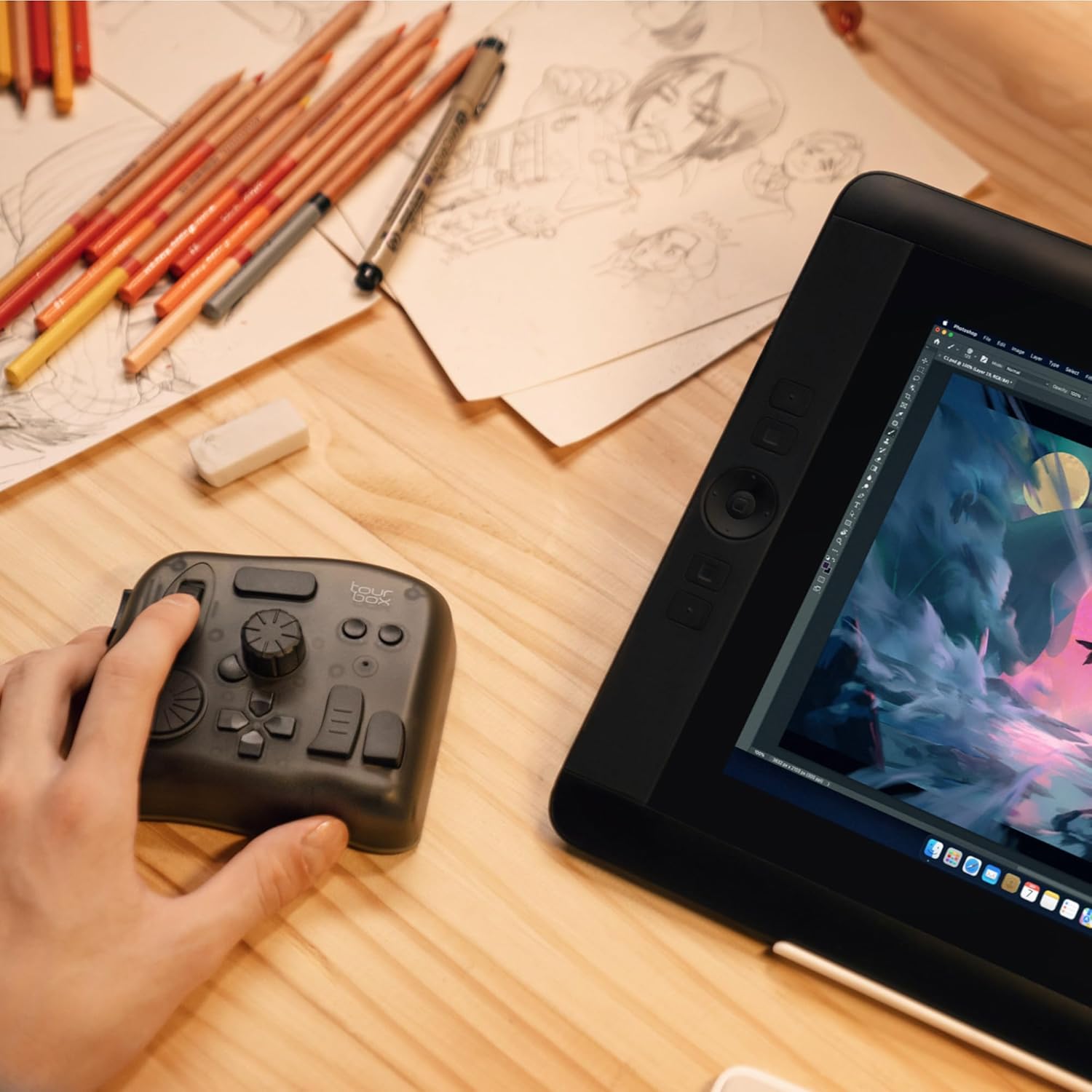
TourBox Elite – Bluetooth Video Editing Controller Color Grading Speed Editor, Intuitive Control, Professional Digital Creator Console for Davinci, Premiere, Final Cut Pro and More, Mac/PC (Black)
$36.99






Product description
TourBox Elite: Your Workflow Game Changer
The video showcases the product in use.The video guides you through product setup.The video compares multiple products.The video shows the product being unpacked. TourBox Elite| Creative Console, You Name It! Merchant Video


1 DYNAMIC MODE AMONG APPS
2 APPLICATION PLUGINS
3 GENERAL PLUGINS
4 MACRO AUTOMATES WORKFLOW
EXPLORE MORE
 TourBox Elite Plus (iPad Support)
Compatible with iPadOS, macOS, and Windows. Maintain the same workflow on both iPad and PC. More Precise, efficient, and intuitive.
 TourBox NEO – Standard
Left-hand console for total creative control. Drawing, Photo and Video Editing, feel like second nature. Retain most of the standard operations.
 TourBox Lite – Basic
Elevate workspace with Left-Handed wonder tool. Enjoy Dual-Hand power, enjoy the price. Simplified layout, reduce cumbersome operation, creative work is so simple!
TourBox Elite is the professional controller with dual connectivity (Bluetooth & USB-C), built for a stable, high-performance experience on macOS and Windows. (Note: For desktop use only; not compatible with Linux or mobile devices like iPad and Android tablets.)
EXTENSIVE COMPATIBILITY: supports major creative softwares like Premiere, Photoshop, Final Cut Pro, Lightroom Classic, DaVinci Resolve, Capture One, After Effects, Clip Studio Paint, SAI, Camera Raw, AutoCAD, Blender, and more
THE MOST POWERFUL CUSTOM SYSTEM: Allows creators to configure each knob, button, and combined keys to their habits, usage scenarios, and programs. Unique customizable screen menus and powerful macro functions simplify complex operations
REVOLUTIONARY VIDEO EDITING & COLOR GRADING: Experience precise, intuitive timeline control with tactile feedback from dials, knobs, and scrolls. The exclusive color grading panel in TourBox Console 5 makes color adjustments simple and user-friendly
FOR PHOTOGRAPHY POST-PROCESSING: Our unique hardware and software design allow one-handed control of tasks like image selection, color grading, and adjustments. The dial aids in image selection, while the knobs provide precise color control
ULTIMATE DRAWING ASSISTANT: Compatible with drawing tablets and pen displays. A single knob adjusts brush parameters like size, flow, opacity, and hardness, canvas rotation, movement, zooming, and tool switching. Ensures a smooth drawing experience
12 reviews for TourBox Elite – Bluetooth Video Editing Controller Color Grading Speed Editor, Intuitive Control, Professional Digital Creator Console for Davinci, Premiere, Final Cut Pro and More, Mac/PC (Black)


Melvin Stevens –
Worth the purchase!
This is a very nice device. I am only a beginner at drawing, but it works well with all the apps I use. Though the haptic feedback seems to be iffy right now… I need to look into this. I don’t use it daily.
Christopher M Eves –
Knocked out of the park
I’ve been editing, doing motion gfx in both After Effects and Cinema 4D for 15-20 years now. I’ve bought a ridiculous amounts of gadgets to “speed up” my workflow. While all fun to toy with at first, I quickly realized how my muscle memory of keyboard and mouse greatly trumped the speed I thought that was giving me. (Looking at you Loupedeck, 3DConnexion Mouse etc). That was, until I got the Tourbox. While difficult at first to train my brain, I found that I very quickly acclimated to the button shortcuts. I can also quickly jump between Photoshop, After Effects, Premiere etc and the new presets instantly pop up for that respective program. I do wish they had an english preset “pack” for After Effects on Mac. So I had to create one from scratch. A bit annoying, but luckily only had to do once.Its extremely well built and feels solid. Every button has its own sound AND feel, so you get multiple levels of feedback to know what you’re pressing without looking down. I thought the TourBox looked sort of silly at first – almost like one of those fidget gadgets, but realized after using it that having every button look AND feel different was purposeful. But I gotta say, it’s quite satisfying to click the buttons.Downside is the unbelievable decision to use AA batteries. Beyond me why they don’t use a rechargeable Li-ion battery. So I end up just keeping it plugged in and not even using the Bluetooth. I feel like I could very easily walk away at night, leaving it switched on, to come back the next day with the expensive batteries drained. I would still get the Elite version for the haptic feedback which you can really feel.Other thing I found odd – the TourBox console does NOT show up as an open program when switching programs on my mac. So if I wanted to quickly Cmd+Tab to the Tourbox console program as I was setting up the profile, it did not show up and I had to manually minimize windows to find the TourBox console. Strange and pretty annoying – Attached photo of what I meant.Everyone’s different, but for me, it was WELL worth it. It’s simple, easy to set up, and just works great.
DingDing Yi –
A Must-Have Tool for Creatives!
The TourBox Elite has completely transformed my workflow for photo and video editing. As a designer, I rely on precision and efficiency, and this Bluetooth controller delivers both in spades. The compact, ergonomic design fits perfectly in my hand, making it easy to access all the buttons and dials without ever having to look away from my screen.One of the standout features is its seamless Bluetooth connectivity. I was impressed by how quickly it paired with my devices, and there’s no noticeable lag, which is crucial when working on detailed projects. It’s compatible with all the major software I use, including Photoshop, Lightroom, and Premiere Pro, and the level of customization is amazing. Every button, dial, and knob can be programmed to suit my specific needs, allowing me to speed through repetitive tasks and focus on the creative process.
BCD –
Not perfect, but you will still love it
The TourBox Pro is a great tool for video editing. Or really — if it’s not the TourBox, you’re probably going to want something similar, and chances are it’ll be more expensive.It’s a handy little controller that works well with most editing software. The included software is straightforward, and setting up custom profiles for apps like Camtasia was simple enough. It does take a little time to get used to if you’ve only ever worked with a mouse and keyboard, but once you do, it’s a noticeable time-saver.That said, it’s not perfect:Bluetooth on Windows is rough. I gave up on it pretty quickly because the connection would drop or the device wouldn’t get recognized. I just leave it wired in now. To be fair, Bluetooth on Windows has never been great, so your mileage may vary — especially if you’re on a Mac.The battery compartment on mine broke almost immediately. It’s purely cosmetic, and everything still works fine, but it’s a little frustrating when you like to keep your gear in good shape.Occasionally, the software stops working and needs a restart to reconnect with my editor. It’s rare, but it happens.Even with those quirks, I really like this thing. It’s well-built, has a good weight to it, and the controls feel great. Once you get used to it, it makes editing noticeably smoother. For the price, I think it’s worth it.
Edward A. Ingold –
Versatile, Well Built, Effective
I purchased the TourBox Elite for video editing in Premiere Pro and photo editing in Lightroom. As a professional videographer, I’m eager to adopt any tool or process which simplifies and speeds my work flow. The TourBox doesn’t do everything, but has many features which would otherwise require multiple operations or keystrokes. Furthermore, the keys can be customized to meet particular needs. The construction is substantial, and key operations are firm and positive. The weight is substantial, and probably deliberately so. It will take time for operation to be reflexive, but I’m improving daily. I ordered the black unit, and the keys are difficult to distinguish visually. I would choose another option had I known.
Kayla –
It’s the best controller I’ve ever gotten!
I love my tourbox it has completely replaced using my flat graphic tablet buttons and using my keyboard, it’s so ergonomic and comfortable and the feedback it gives when I turn the hapticts on even low is great, Definitely worth it for me.
iforgotmyname –
Heavy, tactile, Bluetooth, with easy setup
I got this for audio work to run alongside a 16 key 3 knob macro pad. Setup was simple with the program. It does have to keep running in order to use the device, but that’s fine. The haptic feedback on the knob is pretty great. Super useful for scrubbing, zooming, quickly dropping markers, recording, and stopping. Great build quality. Compatible with Windows 11 it of the box. All functions work quickly and smoothly.
Carlos Espinosa –
Es un dispositivo super útil para el flujo de trabajo en videos. Estoy muy contento con el producto y vale la pena la inversión. Es un dispositivo pesado, se siente de buena calidad y los botones vienen con pre ajustes que te facilita todo.
Amazon Customer –
I like this so much that this is my second unit
Mathieu –
High-quality materials and construction, very heavy-weighted so it stays in place on the desk and feels solid. Haptic feedback is appreciated for feeling the dials’ notches (and can be adjusted per button/dial mapping), but if you don’t need that or Bluetooth connectivity, get the lower tier model.I love the concept of all buttons/dials having different shapes, positions and surfaces, it makes them all so much more unique and memorable.The TourBox Console companion app for configuring button/dial bindings is extremely well designed and easy to use. I love the fact that I can associate actions with pretty much any combination of buttons and dials, so I can get pretty creative on how I set it up for each application, and I don’t feel like I can run out of mapping possibilities. That was a big criteria for me and they scored 100% there.I’m using it in Ableton Live (for audio editing and music composition), in Blender (especially for 3D sculpting) and in Affinity Photo (for hand drawing) as a complement to my Kamvas Pro pen tablet (which was bundled with Huion’s Keydial Mini, but that just can’t compare to the TourBox, given its even grid of similar buttons).The only downside is the price. It is slightly overpriced compared to other hardware of similar complexity (game controllers, keyboards, mice, etc), but I guess that being targeted to a rather narrow professional audience, it’s probably something to expect. But even if it’s rather expensive, I don’t regret my purchase at all and would buy it again any time if I had to.Highly recommended to anyone involved with creative apps and workflows, with so many keyboard shortcuts to remember and trigger.
tomohappy –
Premiere Proでの動画編集作業が多く、作業効率化のために購入しました。Bluetoothの無線接続が非常に快適で、デスク周りがスッキリします。2台同時接続機能でMacとWindows機を切り替えながら使えるのも便利。触覚フィードバックが絶妙で、ダイヤルやボタンの操作感が気持ち良いです。カット、カラコレ、音量調整などの頻繁に使う機能をワンタッチで実行できるようになり、作業スピードが格段に上がりました。各ソフトウェアへの対応も素晴らしく、LightroomやDaVinci Resolveでもプリセットが用意されているので設定に手間がかかりません。バッテリー持ちも良好で、丸一日使っても問題なし。価格は決して安くありませんが、時短効果を考えれば十分元は取れます。本格的にクリエイティブ作業をする方には投資価値のある製品です。
AmazonCustomer –
主にPremiere Pro、Photoshop、Blenderで使う目的で購入しました。高価なので最初は少し迷いましたが、調べるほどクリエイターの間で非常に評判が良かったのと、ちょうどセールのタイミングでもありすぐに決断することができました。ちなみにMacユーザーで、最初はiPad対応の最新のTourBox Elite Plusを考えていましたが、iPadはそもそもショートカットキーに対応していないのでいくらTourBoxの方で頑張っても限界があることを知り、1万円もプラスする程の価値はないかなと考えTourBox Eliteを選びました。設定は簡単でしたが種類が多い分覚えるのに少し時間は掛かりそうですが、それでも既に操作が快適になりとても気に入りました!いろいろなアプリに設定可能なので高価ですがそれだけの勝ちはあると思います。