


StarTech.com Portable Laptop Crash Cart Adapter, USB/VGA Analogue KVM Console, File Transfer & Video Capture, Windows/Linux/MacOS, TAA
Original price was: $566.99.$468.75Current price is: $468.75.


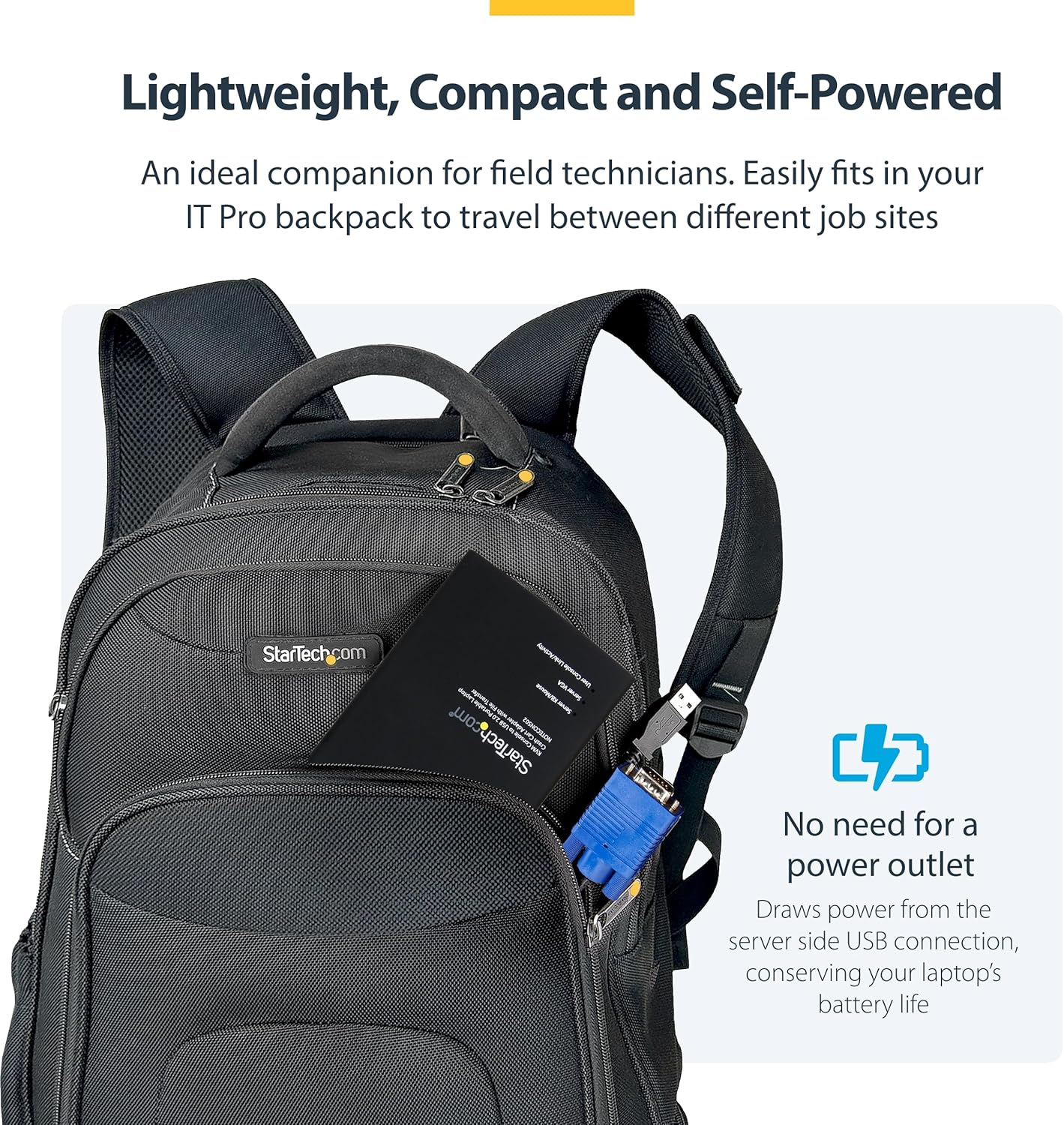

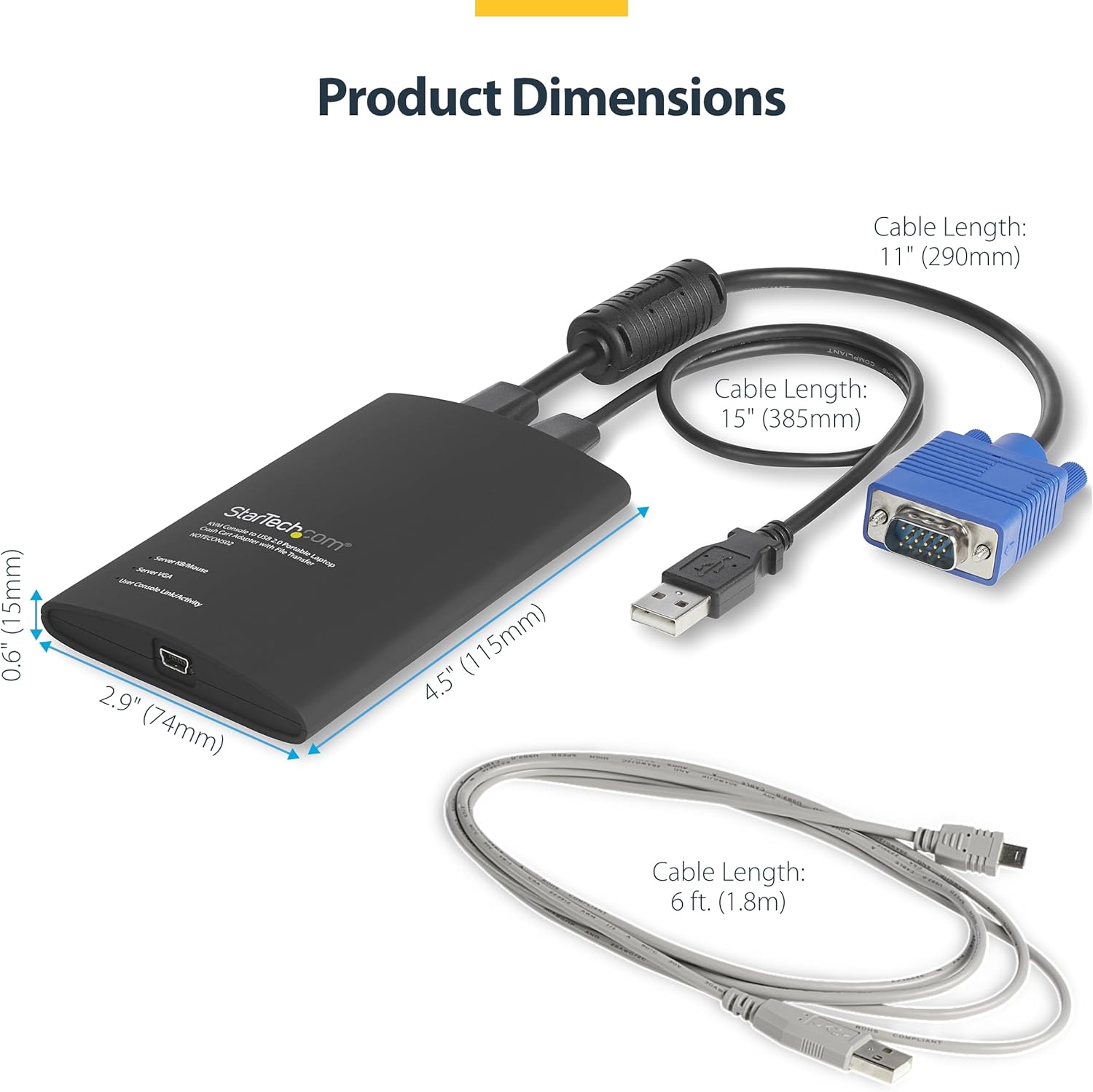

Access any VGA and USB system directly from your laptop via the KVM console adapter Set up quickly with included cables and instant BIOS-level control Easily troubleshoot systems with bi-directional file transfers between local and remote computer Share troubleshooting information and display errors with video capture at 1920 x 1200 60Hz Simple self-powered portability with no external power adapter necessary The USB crash cart adapter gives you control of a headless system, turning your laptop into a portable crash cart for rack servers, PCs, ATMs, kiosks, and more. Simply connect the laptop crash cart adapter to your computer using the included USB cable, then connect the integrated USB and VGA cables to your server for instant BIOS-level control. With no server-side software required, you can be up and running instantly. With the flexible software interface, you can transfer files from your laptop to the server, capture videos for records or instructional purposes, take screenshots and scale the display window to full screen mode or smaller, with no scroll bars helping you to troubleshoot faster. Powered from the server-side USB connection, the KVM adapter doesn’t require an AC outlet so you can connect to any PC or device that has a VGA and USB port, even if there’s no power outlet available. This pocket-sized adapter features a compact design that easily fits inside your laptop bag and requires no additional accessories to connect, eliminating the need to lug around a large, awkward traditional crash cart to troubleshoot and service your systems. StarTech.com offers a wide selection of high-quality KVM-related products to help you access your systems more efficiently without the expense and clutter of extra keyboards, mice and monitors. This USB KVM crash cart adapter is backed by a StarTech.com 2-year warranty and free lifetime technical support. ATM and VLT maintenance and repair Mobile systems and server repair Specifications Warranty Information Warranty 2 Years Connector(s) 1 – Console Interface(s) USB Mini-B (5 pin) 1 – Host Connectors USB Type-A (4 pin) USB 2.0 VGA (15 pin, High Density D-Sub) Environmental Operating Temperature 0°C to 40°C (32°F to 104°F) Storage Temperature -40°C to 70°C (-40°F to 158°F) Humidity 80% RH Hardware Audio No KVM Ports 1 PC Interface USB PC Video Type VGA Number of Monitors Supported 1 Rack-Mountable No Cables Included Yes Daisy-Chain No Indicators 1 – LED Indicators Host/Server Video (VGA) Link User Console/USB Link Host/Server Keyboard/Mouse USB Link Packaging Information Package Height 1,8 in [4,6 cm] Package Length 11,9 in [30,3 cm] Package Width 6,5 in [16,6 cm] Shipping (Package) Weight 12,8 oz [363,0 g] Performance On-Screen Display No IP Control No Hot-Key Selection No Maximum Analog Resolutions 1920×1200 @ 60Hz Maximum Number of Users 1 MTBF 909000 Physical Characteristics Product Length 4,9 in [12,5 cm] Color Black Material Plastic Cable Length 16,4 in [416 mm] 1 x 15in (385mm) USB host cable, 1 x 3in (76mm) VGA host cable, 1 x 6ft (1.8m) USB Console cable Product Width 2,9 in [7,4 cm] Product Height 0,6 in [1,5 cm] Product Depth 4,5 in [115 mm] Weight of Product 6,0 oz [170,0 g] Power Power Source USB-Powered Software OS Compatibility Windows® XP, Vista, 7, 8, 8.1, 10, 11 Windows Server® 2008 R2, 2012, 2012 R2, 2016, 2019 macOS 10.9 to 10.15, 11.0, 12.0 Linux 2.6 to 4.11 (LTS Versions Only; glibc 2.18 or newer required) Special Notes / Requirements Note If you’re interfacing with a Linux device, this adapter is only compatible with standard QWERTY keyboards in U.S English configuration What’s in the Box 1 – Included in Package USB Crash Cart Adpater USB A to Mini-B Cable USB Software Key
BUILT FOR SERVERS & LEGACY SYSTEMS: Ideal for servers and industrial PCs with native VGA video; USB Crash cart adapter connects your laptop to a legacy headless system, turning your laptop into a portable console for servers, PCs, ATMs, kiosks, etc
EFFICIENT TROUBLESHOOTING: Transfer files, take screenshots & log activity using downloadable software (pen drive not incl); Ensure you download & install the latest drivers & software for specific NOTECONS02 model (see additional content for more info)
BIOS-LEVEL CONTROL: Connect a laptop to the USB/VGA ports on a server (cables incl) for instant BIOS/UEFI control; SUPPORT VARIES: keyboard/video/mouse support depend on system firmware; Some systems limit functions (see additional content for more info)
SELF-POWERED: The KVM adapter is powered by the server-side USB connection, reducing strain on the laptop’s battery and eliminating the need for an AC outlet, allowing you to connect to any PC or device with a VGA output port and USB connection
COMPACT DESIGN: This TAA Compliant pocket-sized data center crash cart adapter requires no additional accessories, eliminating the need to carry around a traditional crash cart/trolley when troubleshooting and servicing your systems
8 reviews for StarTech.com Portable Laptop Crash Cart Adapter, USB/VGA Analogue KVM Console, File Transfer & Video Capture, Windows/Linux/MacOS, TAA


OveRMinD –
Great for data center work.
I bought this because I am always going to data centers and hate looking for, or just HOPING there is, a crash cart lying around, or that the client has a KVM in the rack. This easily fits in my laptop bag, and comes with me in the truck or on an airplane. And if you get a 15 foot usb cable with it like I did, you can sit on the hot aisle instead of the cold aisle. You data center monkeys will know what I’m talking about.But it works exactly as advertised. You see everything from POST onwards, on anything from desktops to G9 HP servers. WELL worth the cash. Feels solid built too…hefty…but I still treat it like a baby just because of how expensive it is.Fair warning though…on Windows 8 or newer, they don’t have any signed drivers yet, so you have to boot into the recovery mode and turn off driver signing in the OS, then it will load the drivers and work fine. It will continue to work until you reboot. So if you just put your laptop to sleep, it will be fine. Just keep this in mind if you think yours doesn’t work on Windows 8/10. Once the drivers are loaded the first time, they never need to be reloaded again, but it won’t find the device on USB until you turn off driver signing in the OS.Other than that, this is probably the best tool in my bag.
Scott Seligman –
Great time saver
I tend to work on random computers dropped off at my desk, generally without a PC or keyboard. This product has been a great time saver, I no longer need to track down a spare monitor, or when I’m at a customer’s site beg them for a monitor. I’m able to get my work done and I couldn’t ask for more. I’ve even used the adapter for extended development sessions without issues. To give you an idea how versatile this thing is, I’ve:- Diagnose and repair computers both at work and remotely, including systems that should be headless and stuck in some inconvenient location in a mode that needed some TLC to get running again.- Bring small computers with me to a customer site for work purposes, and use my laptop as the keyboard/monitor.- With the aid of a HDMI->VGA converter box, used this and online meeting software to demo a program running on a tablet remotely, which worked out much better for all parties than pointing a webcam at the tablet.- Demo software on a PC that had no network connectivity to remote customers.The product price might seem a bit much, but to me it’s been well worth it. Even if my only use was because I’m the guy friends and family bring dead computers to, I’d seriously consider purchasing it.My only complaint was a one time event: I had a conflict with this product’s software and the drivers for the StarTech USB to DVI adapter on a Windows machine. I was able to resolve the issue by manually removing the USB to DVI drivers and re-installing the latest versions. That one issue aside, I’ve had no problems with the software.
TEROIT –
Title: The WORST $470 I’ve Ever Spent – Absolutely Useless!
I honestly don’t even know where to start. I paid nearly $400 for this StarTech product, and it has been one of the worst tech purchases of my life.Let’s talk about the clarity first, or the lack of it. The display quality is atrocious. It looks like something from the early 2000s. Blurry, pixelated, and nearly unusable, especially when you’re trying to work on anything even remotely visual. For a product in this price range, I expected at least decent resolution. What I got was a screen so badly rendered I can barely stand to look at it for more than 5 minutes.Now let’s talk about the cursor issue, which is absolutely maddening. The cursor doesn’t align with where you actually press or click. I move the mouse to click something, and it selects something entirely different. It’s completely misaligned and nearly impossible to use for anything that requires precision. Every click is a gamble. It’s like playing a broken video game where the controls don’t respond properly. This isn’t a minor bug ,it’s a fundamental design flaw that makes the entire product unusable.I tried using it in different settings, different systems , nothing fixes the issue. It’s clearly a hardware or firmware problem. This isn’t just disappointing, it’s infuriating. The product is literally not functional for basic use.And for all of this, I paid FOUR HUNDRED DOLLARS. Let that sink in. $400 for something that can’t even click correctly. I feel completely ripped off. This product feels like a scam. It’s not even worth $40, let alone $400.To anyone considering this: DO NOT BUY. Save your money. There are far better and cheaper options out there that actually work.I’ve contacted support and I’m demanding a full refund. For a company like StarTech, this kind of product quality is shocking. I seriously expected better.
Seema Thomas –
This product had the right description of what I was looking for, so I was able to match it easily to my needs. Works well and easy to use!
Cliente Amazon –
Muy útil para administrar servidores
TCJ informatique –
Article commandé pour ne plus avoir à prendre un ensemble écran, clavier et souris.Il trouve sa place dans la sacoche à coté du portable, bien plus pratique et leger en tout cas.
Loyalty –
الشخص التقني يحتاج مثل هذا المنتج الجيد
N. Davies –
works great on macos (even M macs) very reliable, wish it had usb 3 to speed up the iso installs in a pinch and maybe clipboard pass threw. Slightly expensive and niche but works great would recommend!