


Hori Nintendo Switch Blue Light Screen Filter (Blue Light Blocking Screen Protector) Officially Licensed By Nintendo - Nintendo Switch
Original price was: $15.99.$7.49Current price is: $7.49.

Razer BlackShark V2 X Gaming Headset: 7.1 Surround Sound - 50mm Drivers - Memory Foam Cushion - For PC, PS4, PS5, Switch - 3.5mm Audio Jack - Black
Original price was: $59.99.$5.99Current price is: $5.99.
ASUS Hyper M.2 X16 PCIe 4.0 X4 Expansion Card Supports 4 NVMe M.2 (2242/2260/2280/22110) up to 256Gbps for AMD 3rd Ryzen sTRX40, AM4 Socket and Intel VROC NVMe Raid
$74.99
Note: Prices may fluctuate as sellers adjust them regularly. You'll see the latest price at final checkout.
Description


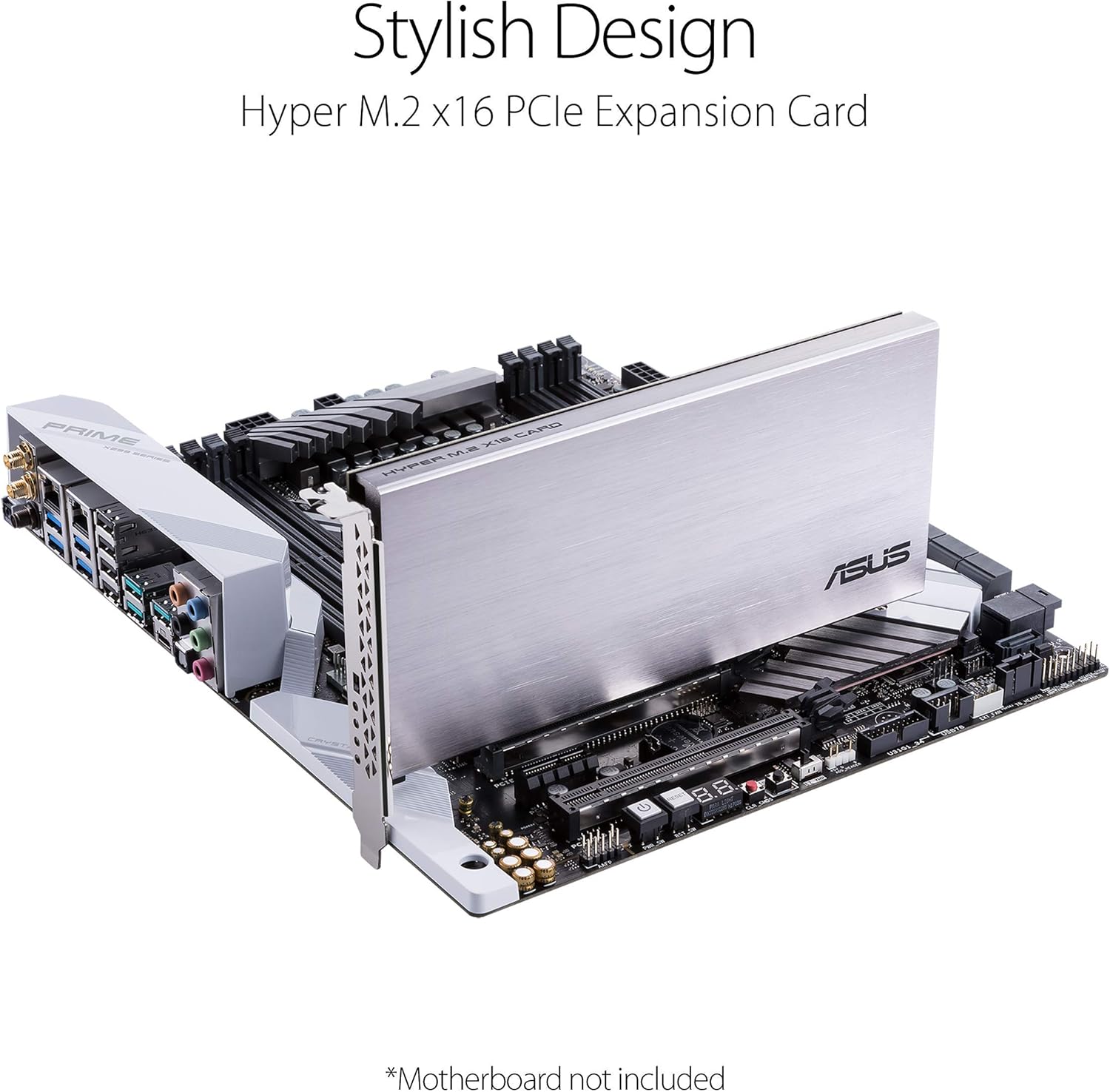
ASUS Hyper M. 2 x16 Gen 4 Card is designed specifically for RAID functions in four M. 2 slots, providing up to 256Gbps transfer speed. Design for AMD 3rd Ryzen sTRX40, AM4 Socket and Intel VROC NVMe Raid. PCIE 4. 0 X16 Interface with server-grade (low loss) PCB material and Supports 14W power consumption SSDs for next gen latest drives.
Supports 4 NVMe M. 2 (2242/2260/2280/22110) up to 256 Gbps in one card by utilizing PCIe 4. 0 bandwidth
PCIE 4. 0 X16 Interface with server-grade (low loss) PCB material, compatible with PCI express x8 and x16 slots
Supports 14W power consumption SSDs for next gen latest drives
Stylish heatsink and integrated blower style fan prevent M. 2 throttling
Reviews (7)
7 reviews for ASUS Hyper M.2 X16 PCIe 4.0 X4 Expansion Card Supports 4 NVMe M.2 (2242/2260/2280/22110) up to 256Gbps for AMD 3rd Ryzen sTRX40, AM4 Socket and Intel VROC NVMe Raid
Shipping and Delivery


Christopher Nelson –
Absolutely Scorching Speeds If Setup Properly
Absolutely rock solid integration with the TRX40 chipset on an ASUS motherboard that has the PCI-e bifurcation option (PCIe RAID mode) that you can activate on a lot via BIOS. Disassembly and re-assembly was a breeze, the correct amount of screws was included, each slot has a full size thermal pad inside ready to go and the fan seems to work wonders even with four SN850X running in RAID0. It’s setting up the AMD RAID drivers properly that is the wild card and can be a complete buzzkill if you do one step wrong. You have to navigate to (for AMD processors) to the support page specific to your CHIPSET, not the processor, and download whatever RAID software package they have there for your AM4 or TRX40 board. You have to enable both SATA and NVMe RAID modes in the BIOS before you can even install the RAID package you just grabbed and once that is on properly, you will see some unrecognized storage controllers in your Device Manager. From there you right click each unrecognized item and point it toward the folder with drivers that came with that package or that you grabbed separately and manually update each of them one by one. Then go back into the BIOS and delete the legacy array housing your single NVMe drives and create whatever RAID array you want there and if all is well it should show up as one single drive in Windows that you can then format as a Simple Volume and manage through AMD RAID Xpert. At each step you might require a few restarts or a full shutodown/power down in order for the changes to fully take. Once you clear this hurdle though, it never reverts and is insanely easy to manage as long as you don’t flip back to non-RAID mode in BIOS.Highly recommend sticking with the 256K allocation size recommended in the BIOS when creating the array and the Windows default value when formatting it in Windows, any other tweaks yielded lesser or spottier performance. As other readers have stated, you must make sure that you have a free x8 or x16 slot for two or four SSDs respectively and you must be able to split the 16 into four siloed lanes for each drive in the BIOS and you must make sure that whatever slot you’re using isn’t sharing lanes with your processor or RAM or another NVMe slot on your mobo. Threadripper platforms are worry free in this department because of the gross amount of PCIe lanes they have. As long as you’re not running two 5090s in parallel and maxing out every RAM, NVMe slot and with some SATA drives thrown in, this should not be a concern.Even I didn’t expect quite the eye watering results I got with four of the fastest 1TB Gen4 drives on the market running in a striped RAID0 setup. The screenshots speak for themselves. That’s basically brushing right up against the theoretical limits of Gen 4 NVMe 1.4 drives and what it should look like when those drives are striped and running free of bottlenecks. For $50 (Used – Like New…came in perfect condition) plus less than $100 each for the drives, this is an absolute no brainer in terms of bang for buck value and will give you performance exceeding that of current Gen5 SSDs by another 8GB/sec. For reference this is a hair shy of the 2400 MT/s base, non XMP clock speed of my 3600 mhz RAM. This is madness. If you do video editing, hosting off your main rig or are looking to trim any possible other system bottlenecks to max out a current gen graphics card, what are you doing still reading??
Waldorf –
This works GREAT…
… in the 16x video card slot with most newer motherboards that use the integrated graphics output (IGD Video) from the CPU. The motherboard BIOS and CPU MUST also support x4x4x4x4 bifurcation of the x16 slot to utilize ALL 4 NVMe slots. Bifurcation is the ability to electrically divide the 16 lane slot into (4) 4 lane slots. This is also dependent on the CPU. Bifurcation is usually listed under I/O settings in the BIOS and should be set to:PCIEX16 Bifurcation = PCIE x4x4x4x4If your CPU/motherboard combo only supports x8x4x4, It will only recognize NVMe SSD’s in slots 3 and 4. Also make certain the MB and CPU support Gen4 for the 16x slot before purchasing and use Gen4 NVMe SSDs to get full throughput. Using this card in a 16x Gen3 slot will cut transfer rates in half as well as using Gen3 NVMe’s. If you have a Gen3 motherboard, Amazon still has the ASUS Gen3 card available.Bought this board to install in my backup server to increase the M.2 capacity. Using it to quickly store large backup images from the 10Gb network. Have scripts that will copy them to platter HDD’s overnight for safe keeping. I’ve successfully tried it on 4 AMD machines using the integrated graphics of: an AMD 9900x, an AMD 7900, an AMD 7700, and an AMD 5600G. All of the AM5 (X670 chipset Gigabyte) and AM4 (B550 chipset Gigabyte) motherboards that I have tried the card in can utilize the NVMe RAID setup in the BIOS. Using settings in the AMD BIOS, it will allow NVMe RAID arrays of RAID 0, RAID 1 or RAID 10. I’m using (2) RAID 0 arrays on this board.I also have a second ASUS M.2 x 16 3.0 Expansion card in one of the B550 chipset motherboards. Uses (4) 2TB Samsung 970+ Gen3 NVMe SSDs that was previously in a Threadripper motherboard. It’s 6 years old and still works every day. If you have a Gen3 CPU and/or motherboard, Amazon’s ASUS Gen3 card will work in the same manner.Make certain your motherboard will support x4x4x4x4 bifurcation and the slot is a FULLY WIRED 16 lane slot. Many new motherboards have 2 or 3 16x slots, however only one (closest to the CPU) is fully wired for 16 lanes. Can’t verify that this will work properly on an Intel board. Your mileage may vary. VOID where prohibited by law. 😉
C. J. Elliott –
Not all Mobo’s will support this. Make sure you get one that supports “Gen 4″Also you will need to reconfigure your PCIE lanes in Bios to 4*4*4*4*, if you leave them at default/16x this won’t work
sailu –
On time delhivery product
Graeme –
I almost didn’t buy this product due to negative ratings and that would have been a mistake. After use and re-reading it is clear all negative reviews on this product simply don’t understand the technical limitations of the environment, to wit: Each NVME requires x4 PCIE lanes, and many motherboards have a single x16 slot (which furthermore requires firmware support for 4x4x4x4 bifurcation). Simply check the support and know that to use all four slots on this card you likely will need to move your graphics card to an x4/x8 slot and/or update BIOS and/or make configuration changes. These options might not be called “bifurcation” and may be “pcie raid” … these firmware and hardware inconsistencies are not Asus’ fault. Just because your PCIE slot looks like a full-sized x16 slot does not mean this product will work. No, this is not an active raid controller.That said, this product for those with the technical aptitude to understand the limitations and requirements is fantastic. There are power filtering capacitors on the board, and other passive components populated to protect our expensive PCIE4-era NVMEs. There is a huge solid block of machined aluminium and the correct riser rubbers/thermal adhesives/risers/screws to mount four single- or double-sided NVMEs.The fan isn’t super useful in a system with above average cooling, and you can simply turn it off. My NVMEs went from circa 90 degrees (on motherboard with no heat sinks, in the random access RW work I use them for) to barely above ambient.The maximum theoretical throughput of x4 PCIE is approaching 8Gb/sec and I see RW speeds at random access approaching 16Gb across 4 drives, I don’t know if sequential RW is at full x16 speed, but with the 4x 980 Pros I use I see ever-so-slightly more than double speed of 2x 980 Pros, so it definitely scales in a linear fashion IF YOU USE x16 IN 4x4x4x4 BIFURCATION!
Tan Hai Yang –
The expansion card is well made. I added 4 more NVME. Now trying to workout how to configure it as RAID10..
Thomas F –
So far after a couple/few months I can say this card works great with my Gigabyte x570 Aorus Pro Wifi motherboard and two pcie gen 4 nvme SSDs. No problems at all so far.Given this card doesn’t have an active pcie bridge/switch I feel it’s a bit overpriced for what is essentially a mostly empty PCB with a fan and heatsink.That said, I have a couple complaints:1. I feel it’s a little overpriced as it’s essentially a bare PCB with no active pcie bridge/switch and therefore relies on your motherboard and cpu to properly support pcie bifurcation (splitting a single pcie x16 slot into multiple separate smaller slots). It’s kind of a crap shoot what any given motherboard will allow. On mine for instance, IIRC it groups the two main pcie slots such that the bifurcation is limited to either: 16/0, 8/8, 8/4/4, 4/4/4/4. Which means, if you use the second slot in any way, you cut your primary slot down to at most 8x and potentially 4x pcie. So your GPU will only get an 8x link at best. Not the cards fault. It’s more of a cpu limitation but something you need to keep in mind. What it does mean is that if I want to use all 4 slots on this card I’d have to set my bios/UEFI to 4×4 mode. If this card had an active bridge/switch, I could assign 8 pcie lanes to the card and it could dynamically allocate the bandwidth between all 4 nvme slots. As it is I’m stuck to “just” 2 usable slots as I want to keep 8x pcie lanes for my GPU.Also I’m not super happy with receiving an obvious return unit as if it were brand new. But there was nothing physically wrong with it and I didn’t want to wait for a return so just kept it.