


WAVLINK Pro Dual 4K@60Hz Universal Docking Station | USB 3.0/USB-C Laptop Dock for Mac & Windows | 2 HDMI/DP Monitors, Gigabit Ethernet, 6 USB 3.0 | Home Office & Multi-Screen Productivity.
Original price was: $129.99.$15.99Current price is: $15.99.



From the brand


Enterprise-class Manageability
WAVLINK’s DL-chip docks enhance corporate productivity with advanced management features. They provide enterprise-level control capabilities, ensuring smooth operations in demanding work environments. Designed specifically for business needs these docking stations streamline essential tasks, allowing IT teams to efficiently manage connected devices while maintaining performance standards across the organization.

Docking Station 5K 2 Monitors
Docking Station 3 Monitors
Docking Station 4 Monitors
Universal Docking Station
USB C 3.2 HUB
Wifi Router
Outdoor WiFi Extender

Let Technology into Your Life!
WAVLINK is a team that inherits the gene of technology and wisdom, will integrate the attitude of human text into the development and design of each product to bring the charm of technological life to users!
The predecessor of wavlink can be traced back to the technology studio founded in California, USA in 1992, which has made remarkable achievements in board products,etc
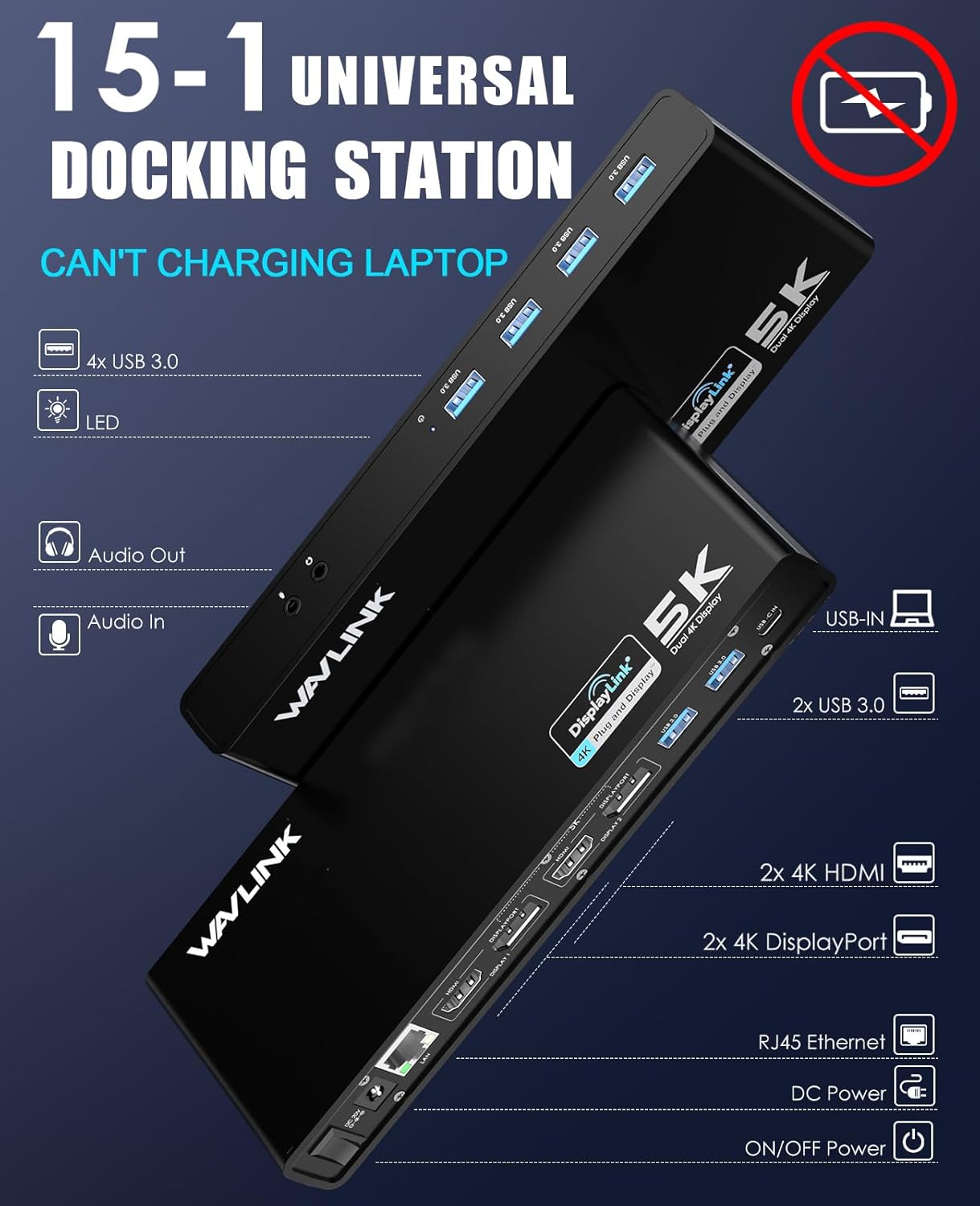
Universal Docking Station – Universal for laptops with USB-A or USB-C ports, including Thunderbolt 3/4/5 and USB4. But it can’t charging your laptop. DisplayLink drivers need to be manually installed for display functionality.
Dual 4K Monitors – Docking station equipped with dual HDMI 2.0 and DisplayPort 1.2 ports, allowing easy extended to two 4K monitors, each supporting resolutions up to 3840×2160 @ 60Hz. It also supports lower resolutions such as 2560×1440, 1080p and more.
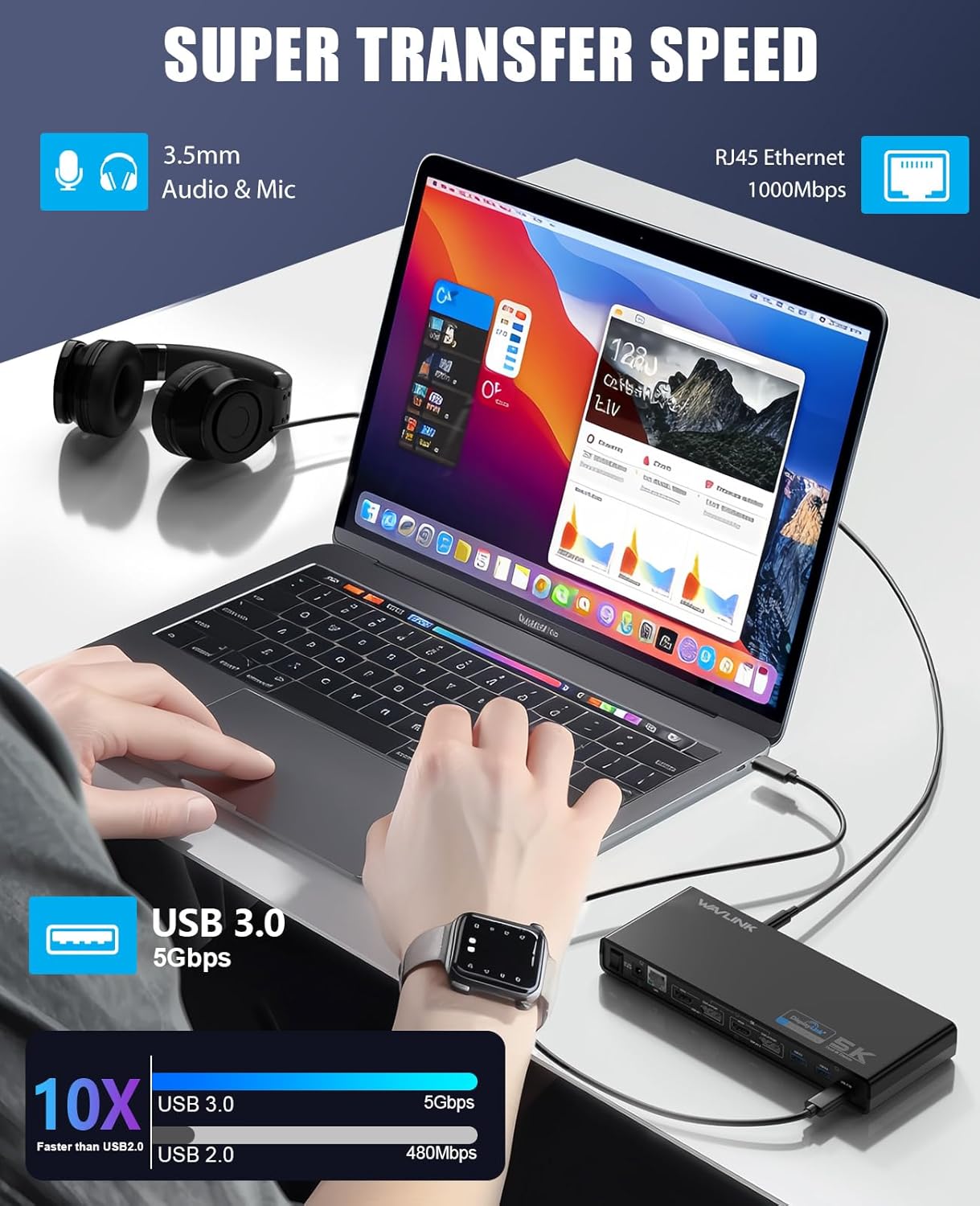
Flexible Expandability – This laptop docking station offers 2 HDMI or 2 DisplayPort video outputs, wired Gigabit Ethernet, a 3.5mm audio jack, and 6 USB-A 3.0 ports (5Gbps). It includes both a USB-C to USB-A cable and a USB-C to USB-C cables for flexible host connections. But this dock can’t charging your laptop.
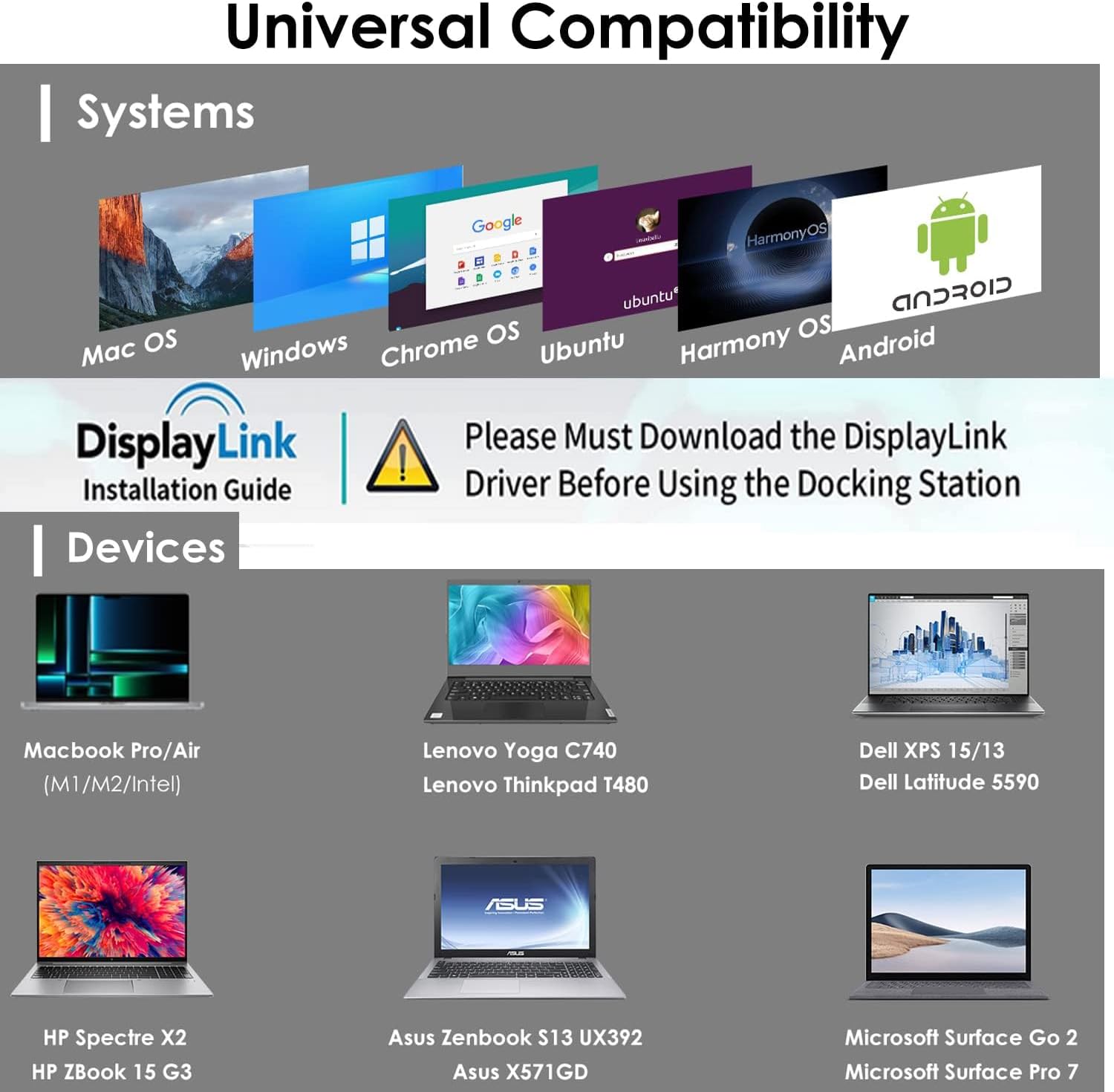
Compatibility – This displaylink docking station compatibility Windows 11, 10, 8.x, and 7, Apple M1/M2/M3/M4 and Intel Macs ( macOS 10.14+ ) and ChromeOS 100+. NOT compatible with Linux. DisplayLink drivers need to be download and installed on the laptop.
Recommended Usage – Used in conjunction with networking and productivity software at home or in the office. This docking station transforms your laptop into a full workstation setup. Not recommended for gaming, video playback, or 2D/3D graphics tools. Does not support HDCP and will not play encrypted or copyright-protected content.
11 reviews for WAVLINK Pro Dual 4K@60Hz Universal Docking Station | USB 3.0/USB-C Laptop Dock for Mac & Windows | 2 HDMI/DP Monitors, Gigabit Ethernet, 6 USB 3.0 | Home Office & Multi-Screen Productivity.


2manyHobbies –
Wavlink support is fantastic in my book.
Bought the product on January 31,2025. Had it for 5 months. It died. I wrote a review indicating it had died. I DID NOT reach out to WAVLINK, they reached out to me. They offered to uphold the warranty and provide either a refund or another product. I was initially skeptical. I was looking at other products on the market, but did not really find one that would fit my needs. I requested a replacement unit. The WAVLINK company immediately shipped me another unit and indicated I should reach out to them should I need any technical support.Did I mention WAVLINK contacted me after they read my review….Connected it the same way I had the previous one and it worked perfectly.Granted this is day 1 with the replacement, but I am most impressed by WAVLINK and their support of their product. I have since recommended to a few friends to purchase WAVLINK products since they stand behind them.The docking station works as advertised. It supports two additional monitors at 4K each. My primary laptop is an HP Spectre with a 4k screen and supports DP1.4 through the thunderbolt connection. For this product to support the 4k screens one needs to understand the capability of the computer (laptop in my case) and its’ capabilities.I am impressed with their product and their support.I have changed my 1 star rating (solely based on it dying and I did not think I would get support) to a 5 star rating for the product and the support team.
sidney impastato –
Quality and Easy to use
This docking station for my laptop works perfectly. It’s easy to set up and use, and it meets all my needs. I highly recommend it.
Bre m. –
Exactly what I was looking for – Just like the description
I compared model after model of USB C docking stations and this was by far my favorite – Supports 2 additional 4k or 1 5k monitor (both HDMI and DisplayPort), has separate mic and headphone jacks, 6 USB ports, and a LAN port.I bought this for my Lenovo Yoga 920 since it has far less ports than i would like for days that i would like to use my External Hard Drive, CD Drive, along with various other USB devices. So far I am very pleased and is exactly what I wanted. I have it command-stripped to my desk to keep it steady in place with my Hard drive ready to go whenever I need it!Definitely be sure to download the Display Link Driver (but not Actual Multiple Monitors unless you plan on paying for it, totally unnecessary). I couldn’t figure out why the HDMI ports were not working until I downloaded the driver.Does not support charging while plugged in, but it has just about anything else you would need. Highly recommend!
The HumanJukeBoxDJMO –
Arrived Quick, Works great – So I Thought…
***Important Edit***I did not know that I would need to run a program to use the display ports. And by doing that, it put a heavy load on my laptop and made my primary programs start glitching out. I can not have that in my setting so I had to return it.Sidenote: You can use the hub without using running the display ports program, The hub itself runs fine and you have full access to all the input slots. But, you can not extend your display at all.The return process was easy and I have already been given a full refund.(Original review below)Bought to use with my 2019 MBP. Primary use will be DJ’n and music production. Out the box and hooked up, I love the sleek size and placement, I will be using all the 3.0 slots. All the slots are running some high end pieces of audio equipment and so far, not a bit of interference using the hub.Hooking up the HDMI ports: of course I had no physical issue hooking up 2 HDMI ports so that worked just fine BUT, in order to use the HDMI outputs you need to download/update the drivers for hub then re-start your computer and give access to the your preferences in order to be able to expand the displays. I do like that I now have 3 displays on my MBP vs my old nonpowered hub that only allowed for 1 screen expansion.Now to the thing that I DO NOT like about this product.The power plug is a brick vs a regular plug. I wish that it was a regular plug as I am using a bunch of plugs to run all my equipment. when you have to add brick plugs into the picture, then you end up loosing a plug slot or have to elevate the plug with a coupler to be able to use with pretty much any power strip. I will be using this hub in both home and professional settings so I will be locating my coupler so that I do not have to loose a plug slot.All and all, for the price and the use for me as a musician, I am very happy with my first impressions of the powered hub. After reading the little instruction book that comes with the product, I learned that you can expand your display’s even more by getting a second powered hub and daisy chaining them together.. Pretty cool but I wont need to go down that road with what all I am using my setup for.I hope this review helps anyone considering this product.#HumanJukeBoxDJMO
Mendel Goldman –
Worked for a month, then chaos
Worked for a month, then the display link started going blank every 5 minutes. I bought this to run two screens for work, and now windows jump around, calls freeze, and I keep losing my place. Tried different USB ports, HDMI/DP cables, power cycling, and two laptops—same glitchy blackout loop.
B –
AWESOME DOCKING STATION FOR PC & MACOS WITH EITHER USB 3 OR USB-C
I have to use a Mac for my day job and I’m remote. So I wanted a docking station that allowed me to use my monitor and home setup for my PC. This docking station is compatible with both!!! Most other docking stations that claim they are for both Mac/PC need to have both be USB-C/Thunderbolt and aren’t compatible if you want to use the docking station with PC through USB 3. On the PC side, it’s plug and play — I literally just plugged the USB cable in and everything was working on its own. For the Mac, I had to download the driver, and once that was installed, it was plug and play as well. EASY PEASY. Display settings recognized everything for Mac.It comes with two cables (one USB 3 and the other USB-C). I use the USB 3 one consistently which also works with the USB-C to USB adapters for mac.This device came up on Amazon search as an ad, and I’m SO GLAD it did because it’s the only one I’ve found that works like this which is exactly what I needed!!!! Plenty of ports for everything, no issues with anything. Stellar product all around!!! Highly recommended.
Jose Ramón Alameda Bailén –
Resuelve el problema de los m1 de Apple. Dos pantallas adicionales, la instalación es fácil, instalar displaylink conectar y listo. Por ponerle alguna pega, no trae puertos usbc o lector de tarjeras. Pero lo importante lo resuelve perfectamente.
Amazon カスタマー –
ノートPCのマルチモニター用で購入しました。PC本体+ディスプレイポート×2の3画面が可能になりました。USBもこの機器から可能なため、本体には1本のケーブルで拡張可能です。持ち運びもするため、全てが1本化出来るのが良かったです。
Vanessa –
💻 Pedí esta estación de acoplamiento porque necesitaba conectar mi MacBook Pro y mi Microsoft Surface Pro de forma fácil y añadir más monitores y puertos para trabajar sin líos de cables. Es justo lo que buscaba para mejorar la productividad en la oficina y en casa.🔌 La conectividad es excelente, con HDMI y DP duales, 6 puertos USB 3.0, Ethernet y audio. El chip Displaylink hace que funcione sin problemas tanto en Mac OS como en Windows, y puedo ampliar dos monitores con resolución 4K@60Hz, algo que antes era complicado en Mac.⚡ La velocidad de transferencia es muy buena gracias a los puertos SuperSpeed USB 3.0, y la conexión por cable a la red es mucho más estable que depender del Wi-Fi. Todo se nota más rápido y fluido cuando trabajas con archivos grandes o videollamadas.🖥️ Además, se adapta a muchas versiones de Windows y Mac OS, así que es compatible prácticamente con cualquier equipo que use. Solo hay que instalar el controlador siguiendo las instrucciones y listo, sin complicaciones.🔧 El diseño es práctico, compacto y todos los cables quedan organizados sin enredos. Eso sí, no carga los portátiles, así que hay que mantenerlos conectados a su fuente de alimentación.💜 En definitiva, esta estación de acomplaiento hace todo más sencillo, conecta varios dispositivos a la vez y te da libertad para montar tu espacio de trabajo sin problemas. Calidad-precio muy correcta para todo lo que ofrece.
CBS –
Cette station d’accueil est parfaite pour mon installation en télétravail.J’y ai branché mon clavier, ma souris, ma webcam, mon micro, mes deux écrans externes et mes enceintes.Désormais, lorsque j’arrive à mon bureau, je n’ai plus qu’un seul câble USB-C à brancher sur mon ordinateur portable du travail pour que tout soit instantanément connecté.C’est un gain de temps et de confort incroyable et avec un très beau design en prime !Elle fonctionne parfaitement et me simplifie la vie au quotidien.Ce que j’ai aimé 🟩 :✔️ La connexion via un seul câble✔️ Le design !✔️ Le grand nombre de ports (USB, HDMI, DP, Audio…)✔️ La simplicité d’utilisationCe que j’ai moins aimé 🟥 :❌ RienPour résumer :C’est la solution idéale pour transformer un ordinateur portable en une station de travail complète en un clin d’œil.Vraiment parfait ! Je vous la recommande sans hésiter.En espérant que cet avis vous aura été utile. 😉
KerryJ –
Works a treat, I run two monitors, podcast mic, camera, mouse and keyboard through it for laptops.