


WAVLINK Docking Station 3 Monitors, Triple 4K@60Hz for MacBook M1/M2/M3/M4/Windows, Displaylink Dock with 3X HDMI or 2X DisplayPort, 130WPD,5 USB Ports, Ethernet, Audio, SD/TF
Original price was: $199.00.$21.99Current price is: $21.99.

From the brand


Wavlink Triple Monitor Docking
Wavlink Dual 5K dock
Docking Station 5K 1 Monitors
NEW WiFi 6 Extender
Docking Station Triple 4K60Hz
Docking Station 4K+Dual 2K
Triple 4K60Hz-No Charging Port
Dual 4K60Hz-No Charging Port
USB WiFi Adapter for Desktop
Wireless Microphone Phone
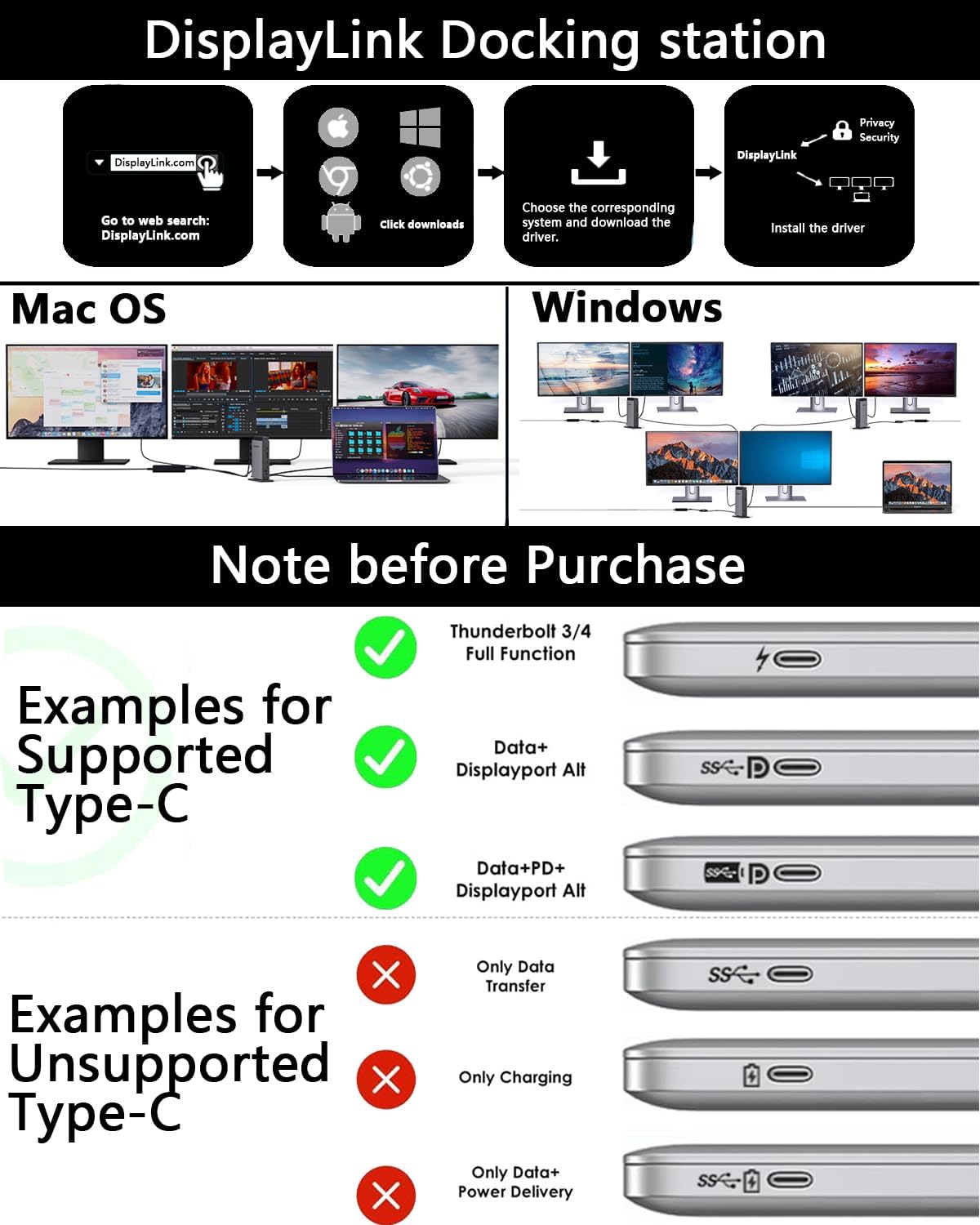
15-in-1 USB-C Docking Station for MacBook: This docking station has 3 HDMI ports, 2 DisplayPort, 2 USB-C ports(10Gbps), 3 USB-A ports(5Gbps), RJ45 gigabit ethernet, SD/TF card slots, and a Audio/Mic ports, a host USB-C port. Connect to a compact laptop docking station via a USB C-C connection to provide convenience for your office or home work. 🌟Attention: HDMI (Alt. Mode) requires your laptop’s type-C port to support video output.
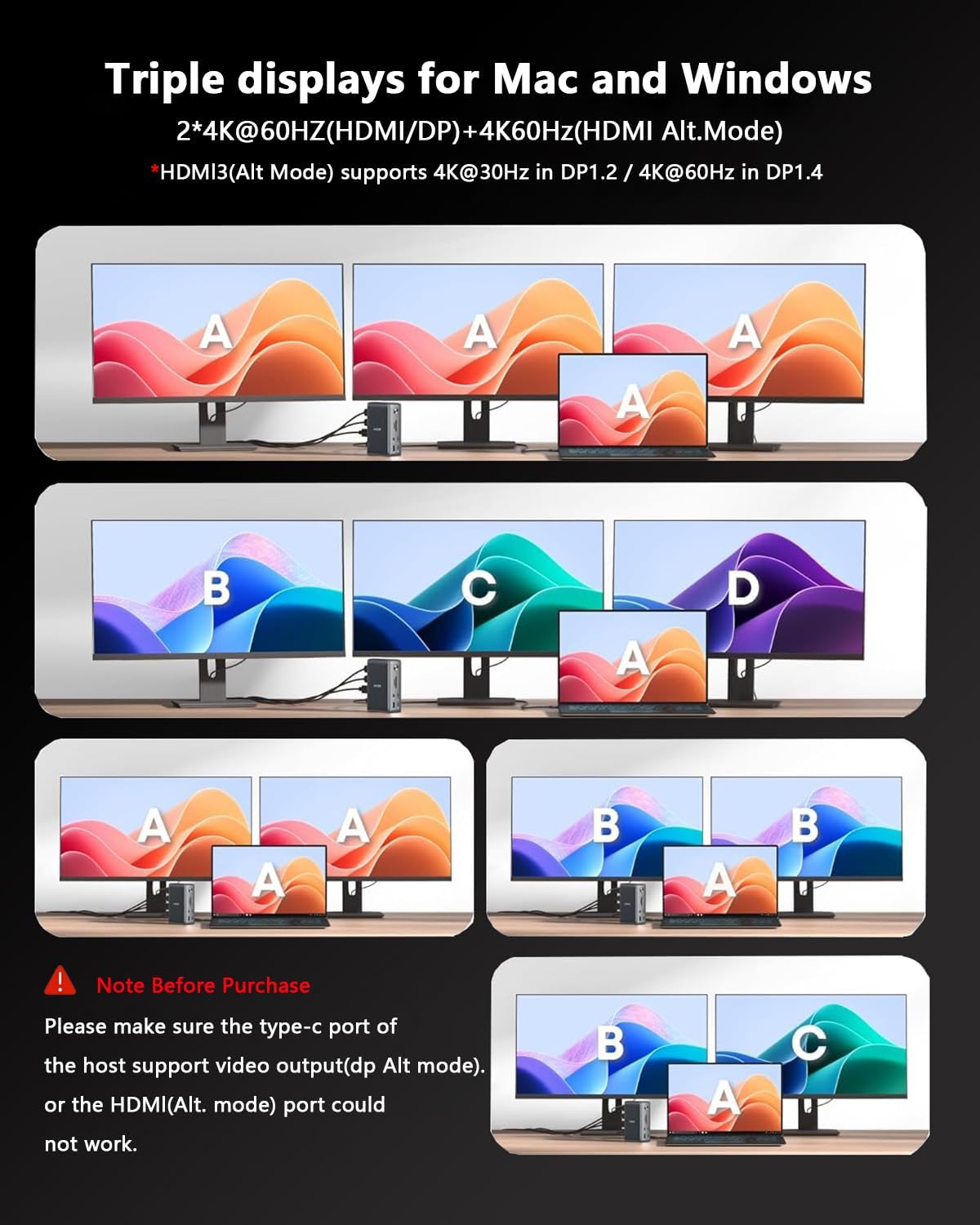
Triple Monitor Docking Station: You can easily connect triple 4K60@Hz displays whether you are Mac or Windows! Experience the special 4K@60Hz high-definition output on the HDMI (Alt.Mode) port for tasks such as video editing and office work. The DisplayLink-6950 chipset supports dual 4K@60Hz DISPLAY on the Display 1/2 (HDMI/DP) port, which is ideal for expanding display options on M1/M2/M3/M4 mac or Windows. ★ Note: Only one of the HDMI and DP ports can be selected.
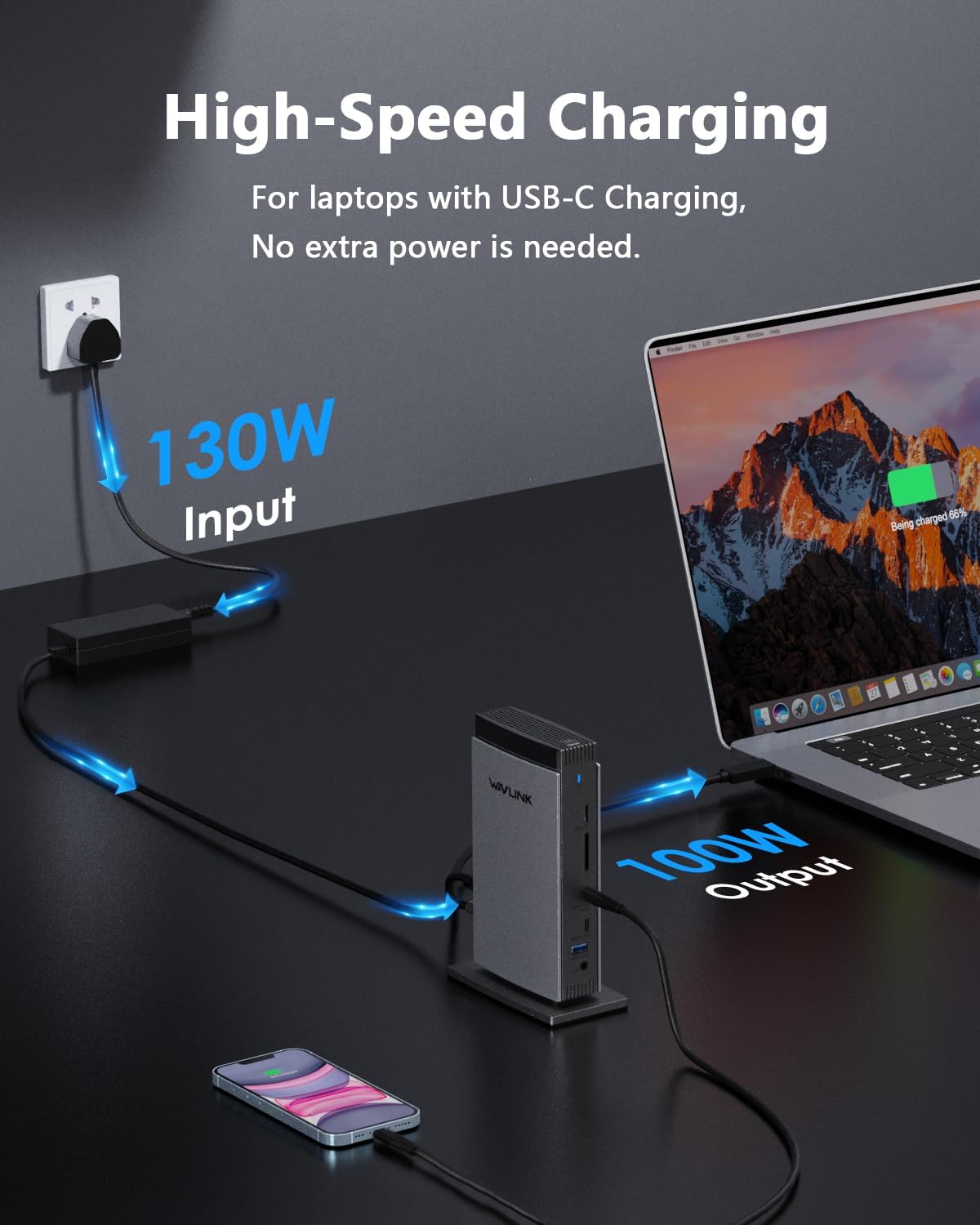
Adequate 100W Power Supply: Equipped with a powerful 130W power adapter, the host’s USB-C port can provide up to 100W charging power for laptops. Additionally, the USB-C port can also supply power to charge your phone or other devices, ensuring they operate continuously throughout the day while also powering connected peripherals for data transfer or display. *Please ensure that the host’s Type-C port supports power delivery functionality.
Wide Compatibility: The Wavlink docking station allows your MacBook to connect to three different displays via the DisplayLink driver, regardless of whether it is an M1/M2/M3/M4 model. Supports Windows 11/10/8.1/8/7/XP/Vista, Mac OS 10.14-14. x and later versions, Chrome OS, Ubuntu, Android, and Harmony OS. *Not compatible with Unix systems, Linux, iOS, and iPad operating systems. Note: The DisplayLink driver must be installed on your device to ensure proper media display functionality.
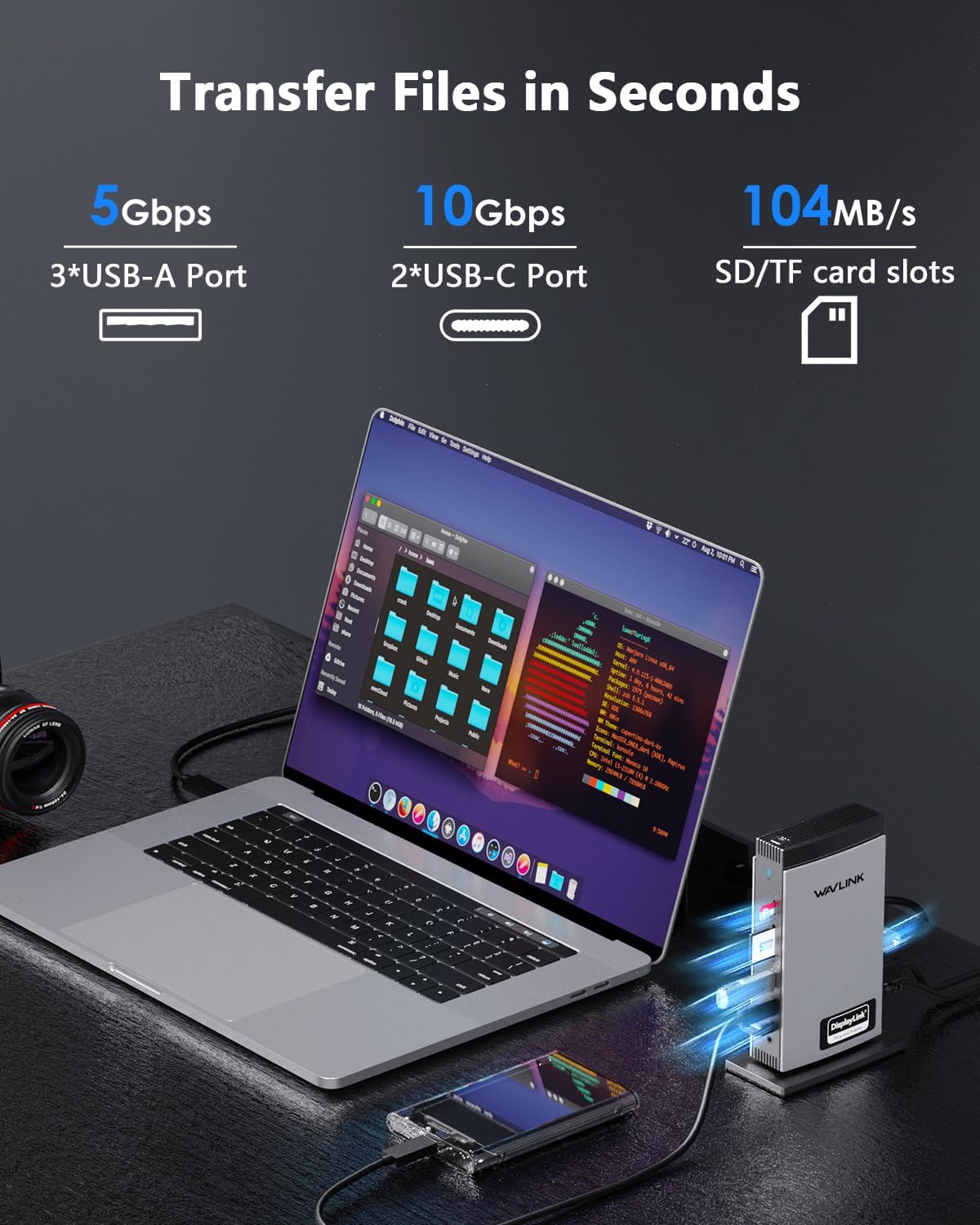
Super-Speed Transfer & Stable Network: Enjoy quick file transfers with 3 USB-A 5Gbps and 2 USB-C 10Gbps ports, perfect for connecting external hard drives and USB devices. The SD/TF card slots offer fast transfer speeds of up to 104MB/s, ideal for photographers, designers, and filmmakers to store their work effortlessly. Stay securely connected with the gigabit RJ45 ethernet port, providing stable wired network performance.
13 reviews for WAVLINK Docking Station 3 Monitors, Triple 4K@60Hz for MacBook M1/M2/M3/M4/Windows, Displaylink Dock with 3X HDMI or 2X DisplayPort, 130WPD,5 USB Ports, Ethernet, Audio, SD/TF


Itsme –
Works great.
The software was easy to find and install (it’s in the item listing). MacBook M4 took right to it and we were able to connect 3 monitors via HDMI and organize them easily. I like that it doesn’t require another power cord or that I have to use my MacBook’s charger. Overkill for what we needed as we don’t use any of the other ports but it “just works” which is important.
JJD –
Just works!
Worked out-of-the-box with my Lenovo laptop, as advertised. In all, great value.
Sam –
Easy to Use – Good Value – Plug & Play
I was in IT for 10 years before some career changes and I’ve been the IT department for my business for the last 10 years. I only have experience with Windows and have not used or tested this with Mac products. I had not heard of Wavlink until trying this docking station. One thing I always look for is whether the product is totally generic and introduced by some importer or if the product comes from an actual company. Wavlink is an actual company with many related products. This means they’ve been actively building a reputation and the only way to do that is to stand by the products in some way.In the instance of the WAVLINK Docking Station 3 Monitors, Triple 4K@60Hz for MacBook M1/M2/M3/M4/Windows, I’m happy. It is clearly marked what goes in and what goes out. The ad is clear about what kinds of power and input is required from your laptop to make this work. Alternatively, there are cards available for your PC that would provide the proper types of USB-C signals if you wanted to run this with a PC.Docking stations aren’t as cutting edge as they once were making them a safer purchase with more compatibility than they used to have. Drivers are more universal which is great for the end user.This docking station is easy to use. Between the easy plugs and the automatic Windows detection there isn’t much to figure out. It isn’t ugly and isn’t big so you can use it on or near your desk depending on what you like. It seems to be built well enough for office gear. It doesn’t need to survive living in a tool box or duffel bag of sports gear. Physically, it will last until it’s obsolete. It feels sturdy and has a good housing.The next thing to know is that extra monitors are really cool and that all your video processing comes from the processor (sometimes video processor) on your laptop. What this means is that extra monitors are great for office work and even simultaneous videos since they don’t take much processing power. You will not be able to play games on your extra monitors. If you’re playing a processor-heavy game, the framerate on the other monitors will drop significantly to become almost unwatchable. This doesn’t affect office tasks but if you’re building something for streaming a game, docking stations are not your answer.Overall, this is super easy to use and the price is pretty good. It’s a save purchase for your Windows laptop. Just doublecheck your USBC logo to make sure it carries the right signal. The ad has a good image to show what you’re looking for.
meh –
Works
If you are looking to power extra monitors that your MacBook can’t power, this works. The quality is less than a proper connection, but it’s more than usable for secondary displays.
Anthony –
4K at 60 and 120hz
Setup was easy. I was able to get one monitor at 4k at 60hz off the display 1 connection and a second one 4k at 120hz off the alt hdmi display. Power pass through works with my thinkpad.
Balancing Life –
Works with m4 max macbook pro
Surprisingly good experience! Driver installation went well, I’m very happy I was able to adjust monitor positioning with the driver software. Works with iOS 26 liquid glass and Tahoe. USB is fast for external hard drive. Unit is silent but does get warm. I wish the power brick was more modern like gAn Tech. The unit itself is not cumbersome.
Nikita Y. –
Pay attention – Only Docks ONE Laptop
I was hoping this item would solve my issue of docking multiple computers. Only works for one laptop, not a desktop.
Jean Carlos Rodriguez Gonzalez –
Works great with MAC
Works great with MAC
MS –
Works easily out of the box. Build quality looks good. Hopefully will last…
Pupin_fr –
Fonctionne parfaitement avec un MacBook Air M3. Les deux écrans raccordés et l’écran du Mac fonctionnent en mode étendu (chaque écran est indépendant) après installation du logiciel DisplayLink Manager, le Mac les voit tous les trois et permet de les agencer. Tous mes accessoires (scanner, disque sauvegarde, enceintes sonores, duplicateur) sont raccordés sur le boîtier. De plus l’alimentation fournie est assez puissante pour tout alimenter y compris la recharge du Mac : je n’utilise plus qu’un seule prise usbc ! Très facile lorsqu’on utilise le MacBook en nomade, une seule prise à lui enficher et tout est connecté !!
sebastian –
Funciona perfectamente Rápido y funciona súper bien lo tengo en un HPcon internet incorporado no falla le doy un 10 al vendedor
SAN M. –
finalmente una docking station che funziona e continua a farlo. con le precedenti avevo spesso problemi con il terzo monitor mentre con questa attacco il portatile e subito funzionano tutti e tre i monitor. veramente comoda e performante. se la confronto con quelle originali del portatile costa anche molto meno. soddisfatto
Nirav Panchal –
Works perfect