


Redragon K580 VATA RGB LED Backlit Mechanical Gaming Keyboard with Macro Keys & Dedicated Media Controls, Hot-Swappable Socket, Onboard Macro Recording (Blue Switches)
Original price was: $69.99.$8.99Current price is: $8.99.


Product description
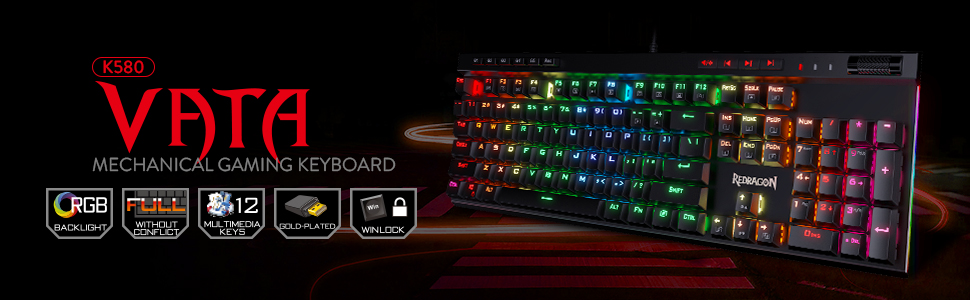
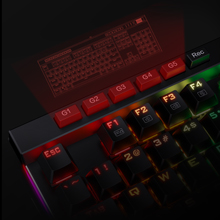
Onboard Macro Keys
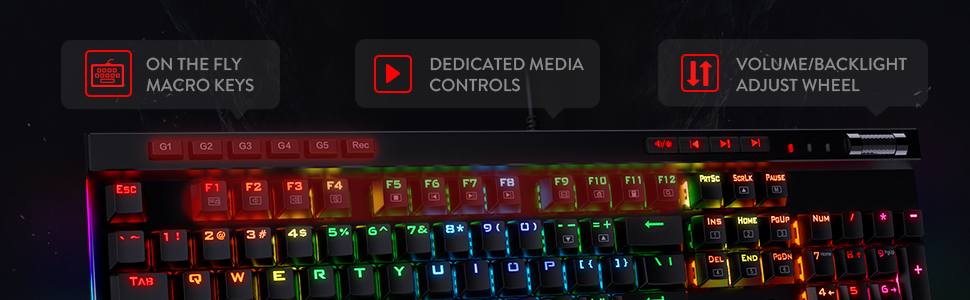
5 programmable macro keys (G1-G5) on the keyboard allow recording macros on the fly without any additional software required to be installed.
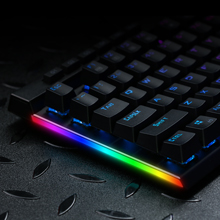
RGB Side Lights
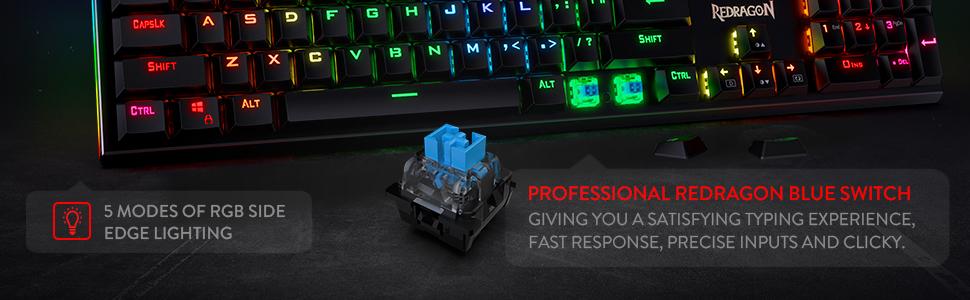
In addition to the 18 RGB modes for the main keys, there are 5 modes of RGB side edge lighting. Angled down and to the side, they will dazzle up your desktop!

Dedicated Media Controls
The controls let you quickly play, pause, and skip the music right from the keyboard without interrupting your game. Scroll bar allows intuitive control with simple motion.

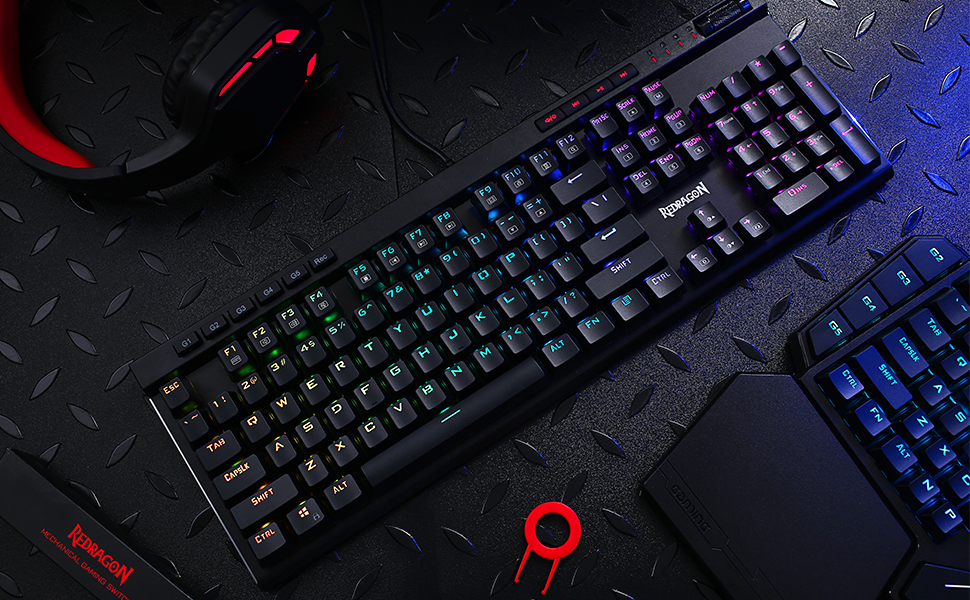
RGB Backlight DIY
The color of each key lighting on the keyboard can be customized easily without installing software, a great choice to DIY your stylish keyboard.
Add to Cart
Customer Reviews
4.5 out of 5 stars 5,633
4.1 out of 5 stars 2,356
4.6 out of 5 stars 7,700
4.6 out of 5 stars 1,679
4.4 out of 5 stars 568
4.7 out of 5 stars 770
Price
$54.99$54.99 $64.99$64.99 $24.99$24.99 $44.99$44.99 $33.38$33.38 $56.99$56.99
Dimension/size
17.3×6.0 in 17.2×5.8 in 11.5×3.9 in 13.1 x 5.4 in 13.9×4.1 in 15.3 x 5.5 in
Keyboard Weight
0.97 kg 0.72 kg 0.43 kg 0.95 kg 0.51 kg 0.92 kg
Switch Type
Blue Switch Red Switch (Low profile) Red Switch Red Switch Red Switch (Hot-Swap) Custom Switch (Litsea)
Keys
104 104 61 81 78 98
Connection
Wired Wired/BT/2.4Ghz Wired Wired/BT/2.4Ghz Wired/BT/2.4Ghz Wired/BT/2.4Ghz
Extra G Keys
5 5 0 0 0 0
RGB Backlit
✓
✓
✓
✓
✓
✓
Software
✓
✓
✓
✓
✓
✓
5 Macro Keys – There are 5 programmable macro keys(G1~G5) on the keyboard which can be recorded macros on the fly without any additional software required to be installed. Easy to edit and DIY your stylish keyboard.
Dedicated Multimedia Controls – The multimedia controls let you quickly play, pause, skip the music right from the keyboard without interrupting your game. Also, designed with a volume/backlight adjust wheel, it’s easy to adjust volume or backlight brightness directly with the wheel in the upper right side of the keyboard. Very convenient and cool looking.
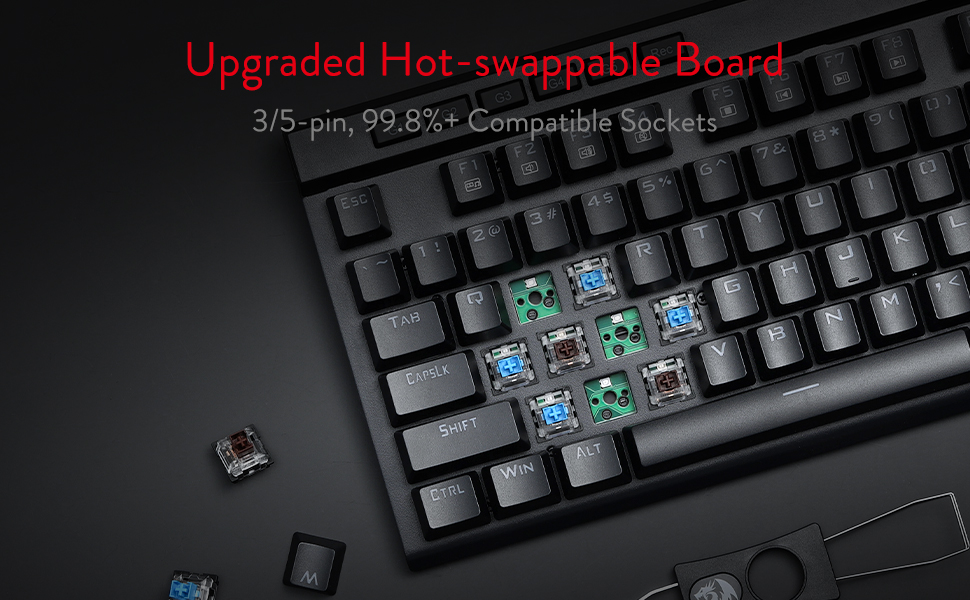
Upgraded Hot-Swap – The brand new upgrade with nearly all switches(3/5 pins) compatible, the free-mod hot-swappable socket is available now. The exclusive next-level socket makes the switch mounting easier and more stable than ever.
Durability – 50 million times keystroke test, 60g actuation force, and 2.3 mm short travel. Special Double-shot injection molded keycaps never fade key font with waterproof and dust resistant mechanical switch.
RGB Backlight – 18 backlight models allow you to type in the dark. You can adjust its brightness with a control wheel or FN + Up/Down. 5 modes of RGB side edge lighting. The color of each key lighting on the keyboard can be customized easily without installing software, a great choice to DIY your stylish keyboard.
8 reviews for Redragon K580 VATA RGB LED Backlit Mechanical Gaming Keyboard with Macro Keys & Dedicated Media Controls, Hot-Swappable Socket, Onboard Macro Recording (Blue Switches)



Treats86 –
Excellent Keyboard – Unfortunate freak issue with the one I received.
This Red Dragon Vata 580 keyboard is exceptional. Five stars! It’s awesome and the RGB, build quality, switches and keys are all great. Hot swap for customization. Great price. The blue switches are clacky and loud, and the browns were also nice switches , although I prefer blues or reds. Looks great.Buying a second one for use with my laptop.Did want to point out that the RGB effects on the wired keebs are way brighter and more exciting than the ones on the wireless board. Which was a bit of a disappointment as I’d love the ability to go wireless but missed the settings on the wired board.Definitely recommend.
Handy –
Absolutely the best keyboard I have ever had with my custom palm rest add on!
My wants for a perfect keyboard were “manual light control”, “softer and quieter key switches”, “good quality”, “decent backlighting”, “easy to read keys” and an attached palm rest that was worth a darn.So looking for a “gaming keyboard” with a decent palm rest, is like looking for a famous unicorn fart. All the supposed “gaming keyboards” that are on Amazon with a built in palm rest are complete garbage or so freaking expensive as to be out of my reach.So I had just given up. But then I found this keyboard by happen chance after watching Jayztwocents show a couple of cool keyboards and it renewed my desire to look for a better keyboard.I love that fact that it has the brown switches and you can manually set the colors without some crappy software.But it doesn’t have a palm rest you say! Yes your right, it didn’t : ) But I took a chance and purchased the NPET WR30 Keyboard Wrist Rest Pad here on Amazon with this keyboard and hoped for the best.I had an idea, but I didn’t have a plan. You see, I type with my keyboard on my lap. And I absolutely have to have a palm rest when typing. So when it got here today, I took them both out and instantly knew that I was going to make this to work. Went digging around all the left overs from the garage and found some old plastic wall file holders and the fix was in. These were the older plastic type with a smoked color and around 1/8″ thick. Took me three times to get the cuts right, but in the end, I had what I needed.A platform to hold my keyboard and wrist rest together without any bulk. Scuffed it up and gave it a paint job, and with some Gorilla double stick tape, the new set up was finished. I took off the rubber pads from the wrist rest and applied them to the new base and walla, an awesome keyboard with an awesome wrist rest.I’ll be honest, this is the first day. But I already know I will not be sending this baby back. It blows my other “gaming keyboard” right out of the door and the brown switches are so nice. The biggest sell for me though was the fact that they used a font that is so easy see. I can type pretty good, but the dang symbols on the top row have always been a bugger for me. So now I can see the right symbol when I need it.Typing on this thing is a dream. The added wrist rest is just the icing on the cake. Super comfy and at the perfect height.So if your looking for a good typing, er I mean “gaming keyboard” with the ability to add a really nice wrist rest super easily, then this is your keyboard and wrist rest combo. Super sturdy and it didn’t add hardly any more weight to it.There is also a guy on Youtube that did a nice video explaining every light setting and macro setting walk through that I highly recommend titled “Redragon K580 Vata RGB controls Tutorial”.Over all, the build is super nice. I did take the top cover off initially just to see what I was dealing with as far as space for fasteners (none). The internals are top notch, and with the aluminum top deck making a very sturdy keyboard for a very affordable price. I would highly recommend this keyboard no matter what keys you choose. Very well made, and well worth the money.
Nicholas Gomez –
Pretty much the best keyboard you can buy for the money.
If you just want to get to the bottom line, this is it: this keyboard is phenomenal for what you’re paying. If you don’t care about brand names and don’t want to pay the high premiums that the industry standards charge, just stop thinking about it and pull the trigger.I’ve been wanting to write this review for awhile. I’ve had this keyboard for over a year, and I’m typing on it right now. I bought it when my previous keyboard, a Redragon Indrah, had started to deteriorate on me (the switches were fine, but the LEDs started to fail. I didn’t take great care of it, so I pin that on me). That keyboard was pretty good; it had full rgb, switches were good and it had macros and media keys. However, besides what I consider a premature failure, it had a large footprint, and it’s looks weren’t exactly to my preference. After considering more established options from Corsair, Logitech, etc., I decided it was better to save the money and buy the Vata since it seemed like an overall improvement over the Indrah at more or less the same price. I do not regret my decision in the slightest.Let’s talk switches and feel first, since that’s the most important part of the product. They feel great. They’re blues on this keyboard, which is how I like it — good actuation force, tactile, and oh so clicky. I don’t have an insane amount of experience on other keyboards, so I’m no expert on the matter, but I usually prefer my keyboard over other keyboards I’ve tried. The main, direct comparisons I can offer are to that of Logitech’s and Razer’s (both newer and older) blues, and I can say for certain that this keyboard is easily on the same level. Cherry clones have come a long way. In most cases I’ve seen their performance nearly indistinguishable, and the Outemus on this board is no exception. If blues aren’t your thing, I know they have the Vata in optical browns, but I can’t exactly speak for those. The keycaps are probably the low point in this keyboard, but by no means are they bad. They have a slight amount of wobble, which may annoy those who are used to more premium offerings, but I find that to be a nitpick — I don’t even notice it. They larger issue with the keycaps is that they’re the generic type with this “gamer” style font that you see on a lot of budget keyboards, so they don’t look too unique or appealing, but more on that later. Overall, the feel is great, and I have no complaints.Now let’s review the feature set. I honestly find this to be just as important as the feel just because I really like having my media keys and shortcuts. A fleshed out feature set on keyboards in this price range is pretty rare, but this keyboard punches the ticket. It has media keys, most importantly a physical volume rocker, which is a huge plus in my book. It has macro keys, that honestly I don’t use too much, but they work fine. They have some shortcuts too, but frankly the one I find myself using the most is the calculator shortcut. You’d think this isn’t something that substantial, but I honestly use it every time I need to use a calculator and I appreciate its inclusion immensely. Really, the only feature omitted that I would LOVE see is a USB passthrough for my Xbox controller or headphones. The other criticism I have is that the feel of the macros are subpar. They are made of this hard rubber material, and have a membrane feel to them. As I said previously, I don’t use macros too much anyways, but I have to mention it. They’re not awful, just okay. The media keys on the other hand have this clicky feel to them, which is great, and the volume rocker is pretty good. Maybe the steps could be more outspoken, but that’s not an issue at all. The extra features for the Vata are absolutely solid, and it’s frankly what makes this keyboard, in my opinion, stand above the rest in this price bracket. The last thing I have to mention is the software. The keyboard is mainly advertised as being able to change its configuration through key combinations, but the keyboard does have software on the Redragon website. Unfortunately it’s pretty bad. I can’t speak on it thoroughly because I only recently found out about it, but you can configure the macros from there, which I haven’t done, as well as the LEDs. I’m not sure if you can customize the individual switch colors (my inclination is no), but you can customize the overall color of each of the effects. I have my keyboard one solid color, so it works fine for that. I have to say the functionality is not all there and the user experience isn’t great.Finally let’s go over the looks and build. Let me open with the chassis: it has a plastic backing with a metal front plate, which makes the keyboard extremely firm. Pretty much absent of any flex, and it has a pretty decent weight to it too. The pads are good, and it has the adjustable back legs to raise the keyboard, which is how I prefer to type. The footprint is slim for a full sized keyboard, which is great. Not bulky in the slightest, but still firm and solid. In terms of looks, I’d say this category is respectable. The frame has a matte finish, which is my preference over anything glossy or brushed. The switch LEDs are great. Unlike the Indrah, none of them have failed on me and they color match my other peripherals on the tee, given the same RGB values. They even have a LED strip on the side of the board which doesn’t look bad, but you can’t really customize through the software like you can with the switch LEDs, which is a bummer. They aren’t too bright either, so they just get a pass from me. The main detractor for appearance on this keyboard are the aforementioned keycaps. They just look okay, and the aggressive but generic font does it no favors. They don’t look bad, but I’ve seen these caps on so many other boards that it’s just disappointing. Also, the light passthrough isn’t the greatest. I wouldn’t be complaining if they had that generic Arial-like font that so many keycap sets have since that seems to be the industry default. I know they wouldn’t have cost more than the caps equipped here, but I digress. You can always easily replace the keycaps if you want, unlike most other things on a keyboard. The build gets a full pass from me, the LEDs are formidable, but the keycaps are my major criticism here.At the end of this review, I have to come back to the price. At less than seventy dollars, this keyboard is criminal. Every time I window shop other keyboards, I can never find a full sized keyboard that at its core is worth it when an offering like this available, so I rarely ever think twice about switching. I love the feel of this keyboard, and the added features such as the media keys are something I can’t be without. Rigidness of the chassis is also something to behold. My main points for criticism is the keycaps, the software, and the lack of USB passthrough, but honestly those three points are pretty minimal in my overall opinion here. The keycaps are probably the worst offense here, but I can’t say they’re bad and I can always replace them if I wanted to. The software is the equivalent of some cheaply made Chinese software, but it works for what I need it to and I don’t like spending too much time in my peripheral’s software anyway — at least it seems lightweight compared to the other suites that I have installed like iCUE or G Hub. Finally, the USB passthrough is really just a nitpick, and is just a quality of life feature I would love to see. I write this lengthy review for the appreciation I have for this keyboard. My keyboard is how I connect to my computer, which is something I spend a lot of time on given my profession, and the Vata serves me well. I just can’t get over the completeness of this keyboard at the price that it’s at. Redragon is a brand that seems like a cheap Chinese brand, and while admittedly their product line seems a bit inconsistent, they do have solid offerings and this is one of them. As more time goes on, I notice they release more enticing keyboards, such as the wireless 60% they just came out with (though I can’t actually speak on the quality of that product). I hope that people realize how competitive of a keyboard this is in its category. I also hope a Redragon representative or related reads this and releases a variation of the Vata with a USB passthrough ;). My perfect version of this keyboard would be a more subtle keycap set, with USB passthrough, maybe even with solid Bluetooth functionality. If they could release that at 90 or less, it’s something I’d pick up in heartbeat.
Burak Özdemir –
Fiyat performans ürünü, parasının karşılığını veriyor. Sadece eksi olabileceğini düşündüğüm tek konu her tuş basımı ardından gövdeden bir çınlama sesi geliyor, onun haricinde içinde kullanılan mavi anahtarlar, oldukça kaliteli ve hoş bir klik sesine sahip.
Kiki –
Amazing quality gonna have to see how it holds up but it’s really good premium material too great feeling when pressingI’m not gonna look at big brands no more
Diego –
Es un teclado muy funcional y estéticamente bonito. Lo uso para jugar mayormente y cumple. Por el precio me parece bastante bien. Un poco ruidoso y trae switches de repuesto o para personalizar
RIRIO –
HyperX Alloy Originsを買ってすぐにwキーが途切れる様になり(致命的)買い替えました。公式ソフトウェアの情報が分からず、ホットキーだけでもマクロが使えてパスワード入力等楽でいいと思っていましたが、全キー複雑なマクロにすることが出来ます。ライトは内臓されたものや個別に好きな色等も可能。マクロ編集もライトアップ変更も、正直HyperXより使いやすい・・発色も綺麗 ホットキーは手元でRECするのみでディレイは勝手に50ms位になります!
Manu –
Llevo ya varios meses usándolo y va siendo hora de plasmar mis impresiones.En cuanto a la fabricación y acabados, sobresalientes. Buenos materiales, teclas que da gusto pulsar (con su característico sonido), y robustez en el montaje.La conexión inalámbrica no tiene lag, la pulsación se corresponde de manera inmediata con el resultado en pantalla, probado a nivel usuario y en juegos online, tipo LOL (prefiero jugar con mando y soy poco asiduo a este estilo de juegos) no hay ningún retraso, o si lo hay es mínimo, entre pulsar las teclas de dirección o de acción y la respuesta en pantalla.El software propio para controlar la iluminación juega con todas las posibilidades: desde el tipo de iluminación, los colores, o la intensidad de la misma, hasta controlar el tiempo de apagado, algo que yo considero fundamental, ya que la gran mayoría de teclados gaming traen un tiempo de apagado por defecto que, normalmente, no suele ser de más de 1 o 2 minutos, y más si es en teclados inalámbricos, para ahorrar batería. Aquí se lo configuras tú.Punto negativo? La batería. Si no apagas el interruptor del teclado, se consume relativamente rápido. Yo le doy un uso intensivo y aguanta un par de días SIN apagar el interruptor, que no está mal, pero ahí sí flojea comparado con otros inalámbricos gaming que he tenido.La carga es aceptable, no se demora demasiado, aunque no he controlado el tiempo que tarda.Y para consultar cuánto le queda de batería, basta con pulsar dos teclas, y se iluminarán del 1 al 0 para indicarnos a cuánto está. Eso sí, una vez que baja del 7, cae en picado.El resto: teclas programables, control de volumen con un rodillo, gomas antideslizantes y elevadores, son todos puntos positivos.Dicho esto, por el precio que tiene, sabiendo que teclados similares pueden costar entre los 100 y los 200 euros, lo recomiendo totalmente.