


OptiSigns OptiStick Digital Signage Player – Android-Based 4K UHD HDMI Stick, Quad Core, WiFi/Ethernet, Remote Screen Management
Original price was: $42.99.$7.99Current price is: $7.99.



Product description


Purposefully Built for Digital Signage
Are you looking for a simple yet powerful solution to enhance your digital displays?
Look no further than OptiSigns! Our OptiStick Digital Signage Player is purposefully built for digital signage and can transform any screen into a digital sign. Ideal for running promotions in retail environments, showcasing menus in restaurants, or facilitating internal communication within your organization, the OptiSigns Digital Signage Player keeps your content fresh, relevant, and impactful.
What Can It Do?

Manage Your Screens Remotely
Effortlessly manage and update your displays remotely from anywhere globally through our intuitive web portal or user-friendly mobile app.

Optimal Network Connectivity
Equipped to support both wireless and Ethernet connections, this robust device offers unparalleled flexibility for network integration.

Easy Content Management
Built for simplicity, OptiSigns is perfect for users of all skill levels. Edit and display high-resolution content effortlessly with our intuitive drag-and-drop interface, a wide selection templates, and support for numerous file types.

Simple Deployment
Featuring OptiSigns pre-installed, this device ensures you’re up and running in no time. Its compact, small form factor fits into any space without the need for mounting. Simply connect it to your display, and it automatically starts up, ready to deliver your content exactly where and when you need it.
Optimize Your Screens With Our Useful Features

App Integration
Enhance your displays with over 160+ app integrations, including real-time social media feeds, weather updates, and videos from YouTube. Use the Designer tool to create visually appealing content and integrate seamlessly with Microsoft and Google workspace apps like PowerBI. Our split screen app allows you to segment the screen into zones, displaying multiple pieces of information simultaneously.

Automated Data Mapping
Dynamically map your API data to digital displays for automatic, real-time content updates without manual adjustments. Perfect for displaying team profiles, building directories, sales leader wall, celebrating special birthdays, or even putting your products front and center. Our data mapping makes dynamic content display a breeze!

Advanced Playback Control
Enhance your digital signage with advanced playlist management features that offer precision and flexibility. Users can control content playback with high precision, setting specific intervals, resuming from the last stop point, and managing sub-playlists and split screen content. These capabilities ensure seamless content delivery and compliance with scheduling needs or advertising agreements.

Easy Content Creation
Transform your digital signage with OptiSigns’ Designer tool and a vast library of thousands of templates. Quickly craft stunning visual content using an intuitive interface that requires no prior design experience. Utilize premade templates, widgets, photos, QR Codes, animations, and Giphys to create engaging displays.

How To Set Up Your OptiStick Digital Signage Player
Connect to Wi-Fi
Setup Wi-Fi with the remote or OptiSigns Admin mobile app.
Pair the Screen and Assign Content
Enter the code you see on our web portal to pair your screen and set up your content. Or, for a quicker option, simply scan the on-screen graphic with your mobile device to do both in one go!
Ready to Go!
Your content will push effortlessly to your screen. Now, you’re ready to captivate your audiences with OptiSigns!
For Best Performance and Stability Designed for up to 16 hours of reliable daily performance. Maximize your efficiency by using up to 3 split screen zones
How Our Customers Are Using OptiSigns


Frequently Asked Questions About OptiSigns
1. What makes OptiSigns different from other digital signage devices? Unlike basic media players, OptiSigns is a full-featured digital signage platform. It offers 100+ integrations (like Canva, Google Drive, Power BI), remote screen control, user management, and content scheduling — built for serious business needs.
2. How does OptiSigns work, and what can I do with it? The OptiStick turns any HDMI screen into a professional digital sign. After setup, simply push content to your screens using our cloud-based dashboard — no subscription required to begin. Create content from scratch using our editor, or choose from hundreds of customizable templates. Whether you’re displaying menus, dashboards, or announcements, OptiSigns gives you full control to deliver dynamic content across one screen or many.
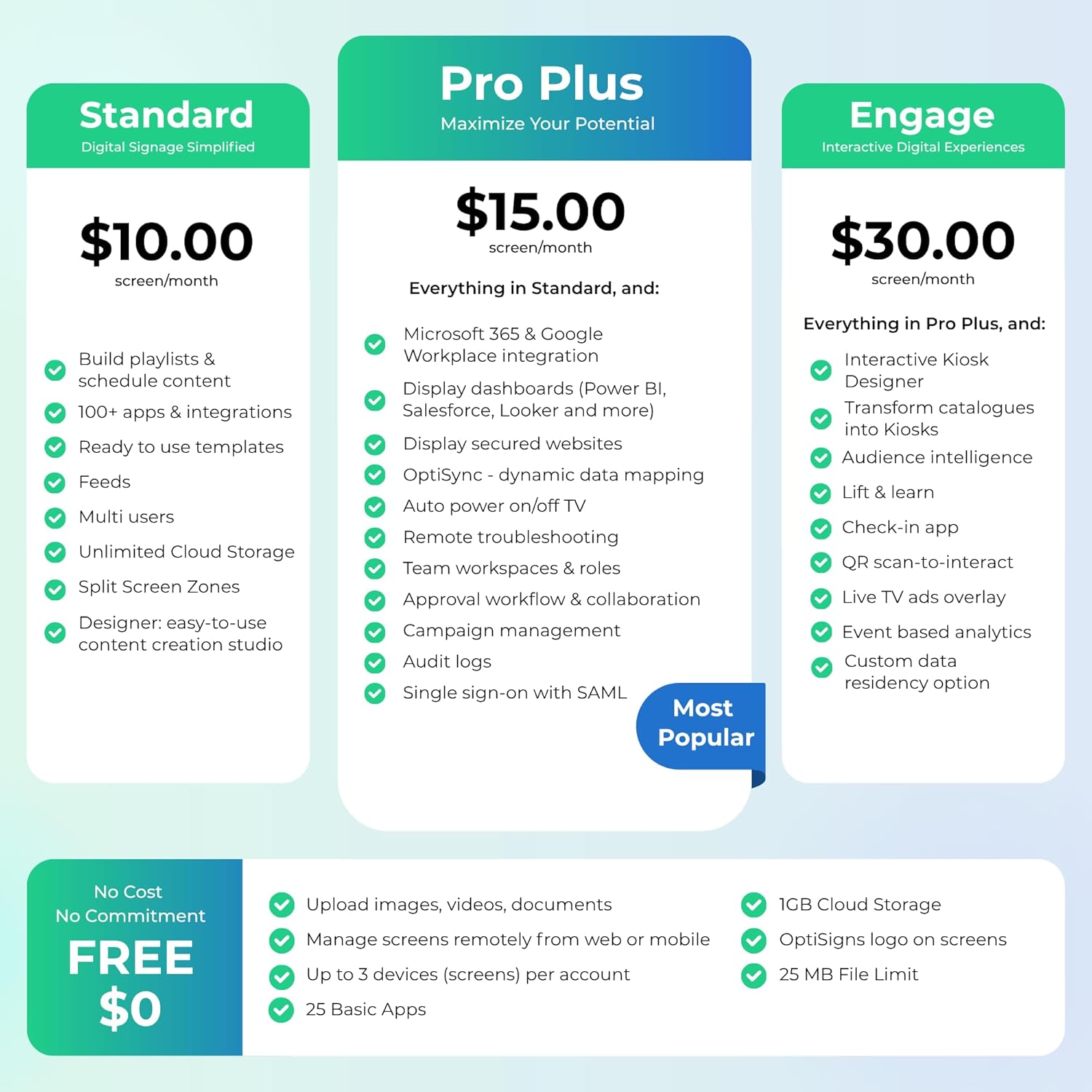
3. Do I need a subscription to use it? No subscription is required to get started. Our free plan supports up to 3 screens with OptiSigns branding. Upgrade anytime to unlock premium features like advanced scheduling, remote management, team access, and more.
4. Is it easy to set up? Absolutely. The OptiSigns player is plug-and-play — just connect it to your screen, power it up, and log into your OptiSigns account. Most users are up and running in minutes.
5. Who uses OptiSigns? Trusted by over 25,000 companies — from restaurants and retailers to schools, offices, warehouses, government, and more. Whether you’re running one screen or managing a national signage network, OptiSigns scales with you.
6. What types of content can I display? You can show everything from images, videos, menus, and announcements to dashboards, social media feeds, live news, and YouTube. OptiSigns supports 100+ content types and integrations, and it’s not just for static slides — you can display real-time, dynamically updated content that changes automatically based on schedules, data feeds, or user input. Perfect for digital menus, dashboards, event boards, alerts, and more.
7. What apps and features does OptiSigns support? OptiSigns integrates with 100+ apps, including Google Workspace, Microsoft 365, Canva, YouTube, social media feeds, Tableau, and more. You can design content using our built-in editor, split screens to show multiple types of content at once, manage screens remotely, automate real-time content with data feeds and APIs, control playback timing and schedules — and much more. These powerful features are just part of what makes OptiSigns a flexible, all-in-one platform for dynamic, data-driven signage.
8. Can I manage multiple screens remotely? Yes — manage all your screens from any device using our cloud-based software. Group screens by location, assign content, monitor uptime, and push alerts in real time.
9. Does it support 4K resolution? Yes, the OptiStick Digital Signage Player supports up to 4K output, delivering crisp, professional visuals on compatible displays.
Optimized for Digital Signage, Suitable for digital signage use, fully support all OptiSigns features, apps.
Easy Setup and manage from anywhere, pre-installed OptiSigns Player, manage your screen from OptiSigns portal or OptiSigns Admin app.
Lots of Integrations,160+ apps help you quickly and easily put useful content on the screens
Easy Content Creation, 5000+ ready to use templates and easy to use designer help you design your digital signs in minutes
Small and Powerful, easy install, no mounting brackets and screws, Amlogic 4 Core CPU, 2G DDR4 RAM, 16 GB eMMC, 4K HDR support, AV1 decoding
OptiSigns subscription required. Free plan supports up to 3 screens per account (with OptiSigns branding). Each OptiStick powers one screen.
9 reviews for OptiSigns OptiStick Digital Signage Player – Android-Based 4K UHD HDMI Stick, Quad Core, WiFi/Ethernet, Remote Screen Management


Amazon Customer –
Amazing
I LOVE this. I use it daily for work, it makes my job so much easier.. None of that daily transferring from a computer to a usb to the tv. So happy I found this. I am only using the free subscription so far and it’s still amazing, small Optisigns logo in the cornier of the screen which is fine and I’m 100 percent ok with that but of free advertising for them.but It does what I need it to do, and I highly recommend it.
Gary –
Good enough for a non-profit
I’ve been researching a lot of video billboards but this seems to be the best for my purposes.This is for a non-profit so care was taken in selecting a product that is easy to use and more importantly easy to maintain and update.This seems to fill the bill at the moment realizing that this is a dynamic business with companies coming and going.OptiSigns seems to be a sustainable entity. Of course you have to pay for the service however that should be reassuring that they have a profitable entity.Even companies like Google and Amazon have been known to have jettisoned business that is not core to their business.
M. Mediate –
Exactly what I needed
The player works great and it’s easy to setup. The online software works really good and they give you a ton of templates to work with for new ads. It does cost $10 a month but you get what you pay for. You
CU –
Used for Senior with Memory Loss for over a year. Lifechanging difference for both of us.
My mother in law has memory issues and lives in a assisted living facility not local. She forgets things, calls to ask the same questions repeatedly, and loses track of time. I thought long and hard for a solution that we could manage remotely and help her. Found Optisigns and have been using this device 24/7 for over a year.Because she has her own apartment in the facility, I was able to install a second TV for the Optisign. We created slides that display time/date, activity schedule, meal choices for the day, answers to questions she constantly asks, family photos, and any messages she needs to remember. It’s like the infomation signs you see in every hotel the displays information to their guests, but customized for her instead. We can update the slides from out of town and they are pushed to her TV. The slides continually rotate and play 24/7. Seeing the messages over and over works great for her and prevents so many worried phone calls. For someone with memory loss, this constant information makes a world of difference in her life.Yes, there is a subscription, but it’s worth every penny. The online interface is easy, there are pre-made slides to display the current time/date, and link to Google Slides. Any update to my Google Slide and it’s captured and updated on Optisigns. This little device running 24/7 for 16 months now is incredible. There has been 2-3 times over that period where it needed to be reset. To solve this, I power it with a smart power adapter that I can also power on/off remotely.I hope this information helps others in similar situations. I tried 3 other similar services before deciding on Optisigns. Many of them used streaming devices (Apple TV, Amazon Fire Stick) but I cold not get them to work 24/7 like the Optisign device. This is definitely one of the products that has made the biggest difference on Amazon.
DIEGO BECERRA –
Quality of product
Excellent item!!
JS –
Worth it
This is what you need if you want an inexpensive option for a digital sign – we got it for our church and we are glad
Erick Villaran –
HDMI adapter broke
I was using it for Optisigns and in less than 6 months and the HDMI connector broke.I desoldered from the case leaving just the pins out.Not sure what could it been, it was connected to the HDMI extension but it was clearly a poor build.I thought by paying the extra cost from a fire stick was going to get a durable product so ended up going back to using a fire stick for optisigns.
Mike –
Excellent Quality
Easy to use. Love the Remote Controlling Capability and OptiSigns Overall Excellent Product and superior Support that I have experienced.
Dani Thomas –
Bought this a few days ago. I also subscribed to optisign pro plan at $20 a month. If you do a stand alone with usb then you don’t need this or if you are there to turn the tv on and off then that’s different. I am not at the office to do this so the pro plan allows you to schedule different times on different days, months in advance. I need that flexibility as the store hours are different on different days. I used canva to make the mp4 which can be downloaded in 4K. The canva is tricky as if you don’t make the text boxes big enough – you will lose some wording – so play with that. lol. Overall, you don’t need a degree in computer sciences to figure this out. It took a few days for me to ‘play’ with the system. Both canva and optisign were new to me. We bought a smart – dumb tv in 58″ hisense. Hisense or cheaper models work the best. No firestick or roku or amazon on there, just plain led tv is best. I am very pleased with the optisign stick so far, no glitching or black outs and should be more stable then using ubs stick in the back over time. It gives nice hdmi quality. It helps if you have internet at the store – which we don’t – so I can do updates and then go to the store and hotspot the tv to download the new files. Works best if you have wifi at the place you have your digital tv. I had to call the optisign people and they were super helpful and patience – so that is good news.