


JOUNIVO USB Microphone, 360 Degree Adjustable Gooseneck Design, Mute Button & LED Indicator, Noise-Canceling Technology, Plug & Play, Compatible with Windows & MacOS
Original price was: $24.99.$17.99Current price is: $17.99.


Product description


Why Choose JV601 Desktop Microphone?
Mute Switch with LED Indicator: For a clear indication of the PC microphone status.360°Flexible Gooseneck Design: The gooseneck laptop microphone allows you to adjust the perfect angle, height or swivel to show your charming voice.Best Choice for Podcast: USB microphone picks up is very crisp and very clear, fast and accurate recognition.Plug & Play for Win/Mac Computer and PS4: USB desktop microphone with plug & play compatible with Win 7/8/10/11, Mac, and PS4. Professional in recording, dictation, YouTube, Skype, gaming, streaming, podcast, etc.Desktop Base: Gaming microphone with heavy-duty housing ensures firm support for the long gooseneck.
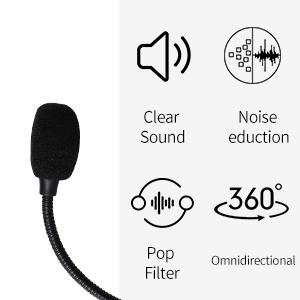
Clear Sound with Noise Reduction Tech Intelligent noise-canceling tech not only can pick up your smooth and accurate voice but also can reduce background noise and echo
Omnidirectional Polar Pattern Omnidirectional microphone pickup the sound from 360-degree with high sensitivity

Built-in JOUNIVO Upgrade Chip Built-in JOUNIVO’s upgrade chip make sure to pick up the high-quality sound when gaming
Perfect for Recording, Gaming, Live Chating, Video Conference ,etc.

What can I do when the microphone cannot be used? Few ways for troubleshooting:
A.You need to disable the computer’s onboard mic by accessing your sound devices in the hardware section of the control panel. And choose the mic (JV601) B.Check whether the “mic mute” of the online control is open or not. When the “mic mute” is open, the light will turn red.C.Please don’t connect the microphone to an extension adapter(includes USB hub), or it will weaken the signal sent from devices. The cable length is 1.8m (6ft), long enough for daily use.
Specification:
Compatible with Windows 7/8/10, Windows Vista, Windows XP
Macintosh: Mac OSX(10.4.11 or higher)
USB Compatibility: USB 1.1 2.0 and 3.0
Polar pattern: omnidirectional
Size: 4*4*12 in
Cable length: 6ft
Package Included:
1 * Microphone
1 * User Manual
360 Degree Position Adjustable Gooseneck Design –Plug and play USB microphone Pick up the sound from 360-degree with high sensitivity, in the best possible location for sound to your PC gaming, dragon voice dictation, and talk to Cortana
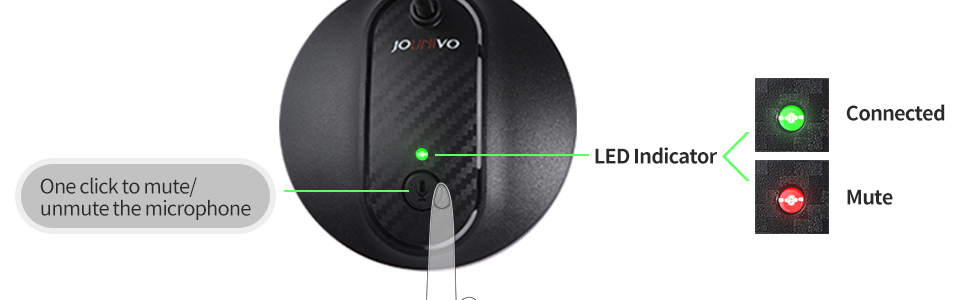
Mute Button & LED Indicator –One-click to mute/unmute your microphone for pc, Build-in LED indicator tells you the working status at any time
Intelligent Noise-Canceling Tech –Premium omnidirectional condenser microphone with noise-canceling technology can pick up your clear voice and reduce background noise and echo
USB Plug&Play(1.8/6ft USB Cable) — No driver required. Just need to plug & play for the microphone to start recording, well compatible with Windows(7, 8, 10 and 11) and macOS. (NOT compatible with Xbox/Raspberry Pi/Android)
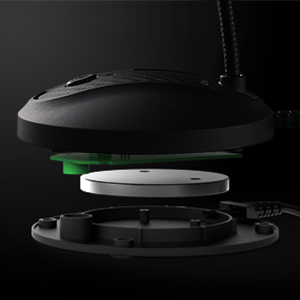
Solid Construction–Adopting premium metal pipe and heavy-duty ABS stand to make sure that you will be satisfied with our computer mic quality
12 reviews for JOUNIVO USB Microphone, 360 Degree Adjustable Gooseneck Design, Mute Button & LED Indicator, Noise-Canceling Technology, Plug & Play, Compatible with Windows & MacOS


SLL –
Reliable, high-quality sound capture at a very reasonable price
Reliable, convenient, high sound quality, and great price.My mic is very reliable: works consistently without needing drivers or setup; and no failures of any kind in the 5 years I’ve been using it on a daily basis.The sound quality is a significant improvement over the built-in mic on my company issued laptop. My voice is noticeably clearer on calls, and it does a surprisingly good job of isolating background noise.The ergonomics is good too. The gooseneck is easy to position and flexible, and the mute button is convenient for long meetings.My next mic would probably still be from this Jounivo brand, worth every of my hard-earned dollars.
Jacklyn Marie Avila –
Great quality, easy to use
This works beautifully and is a great value for the price. It was so easy to connect and setup and the sound is clear and crisp. Very happy with this purchase.
Joseph –
eeeehhhh.. You won’t win any Grammys with it
functional and the price is low. But if you are looking to produce quality sound, I would suggesting spending mor and get a higher end product.
Josh W –
This is literally the BEST PC microphone under $50.00 you’ll find. It’s excellent!
I’ve spent quite a bit of time messing around with PC microphones and such over the years, and after trying, using, trying other microphones, going back to this one, I can feel confident is the statement that this is the BEST PC microphone you’ll find out there under the $50.00 price point. I’d say it’s probably better than some in the $70.00 range, if not comparable at-least. The microphone itself is simple and straightforward. It’s simply an electret condenser element in the small head, and inside the weighted base is the amplification/power circuity to drive the element. It’s a very simple and time tested design that works well. For under $20.00, this is a bargain. I own two of them on two different PC’s and they both work flawless. I have the basic model with JUST the mute button. I didn’t like the option of having a gain knob there, it’s a little redundant to me when one can control their microphone sensitivity with Windows anyway.The audio quality of the microphone is excellent for most users. You’re NOT going to get super high fidelity wide range audio with this microphone. What you ARE going to get though is clean, clear, communications grade audio that’s perfect for Skype, Zoom, VOIP calls, basic speech recording, and the like. Higher audio quality is going to require a more expensive microphone obviously, that’s just how microphones work. Don’t let this deter you though. The audio quality and frequency response for basic use is exceptional.It’s a winner. Highly recommend.
Anthony –
Great deal, excellent quality!
I certainly didn’t expect this microphone that I received from Amazon would actually work so well. I almost ordered a different microphone that was much more expensive. That would have been a true waste of my money. I guess it’s not too often that I would expect such a high quality product at such low price. Live and learn is all I can say. I took a risk thinking I can always send it back. But this microphone is here to stay. I purchased it so that I could practice reading aloud. But when I played back the first recording of the text I had read I was completely surprised at the quality of that playback.
Iryna –
inexpensive and very convenientю Easy installation
An inexpensive and very convenient microphone model. No special installation or drivers are required. The microphone connects automatically when connected to a computer via USB. Installation is also automatic. No additional settings are required. The manufacturer provides an extended 2-year warranty upon registration on their website.The microphone supports many different languages. Speech recognition is excellent, with virtually no errors. The microphone has a convenient mute button. The device has a modern design. The flexible tube allows you to position the microphone wherever you like. I’m very happy with the purchase.
Amazonn Customerr –
Hard of hearing, not worth the headache
When I first got this plug and play USB microphone it wouldn’t work. I tried troubleshooting I tried unplugging it and plugging it back in I tried plugging it in a different USB port. Windows detected it and saw that it was there it just wasn’t hearing any sound. So I tried it on another PC and eventually got it to work and then eventually I got it to work on my laptop. My analog plug-in microphone and my headset microphone and the microphone built into my laptop all work fine and then this j o u n i v o jv603p will suddenly go back to not hearing anything and I’ll have to start over and troubleshoot and unplug it and plug it back in and get it to work again. as soon as it’s working again I just assume it’s going to be working when I actually go to use it and then when I go to use it I usually end up having to spend a half an hour trying to get it to work again. the amount of sound this microphone picks up is underwhelming compared to my wired microphones and the onboard microphone built into my laptop even with the microphone level at 100%. If I can figure out and recreate a root cause for when it stops working again I will update my review. That being said, I have encountered exactly one plug and play USB device in my lifetime that didn’t work when I plugged it in and that would be this device. I was frustrated the day I got this product and it continues to frustrate me on a regular basis. Ways Windows describes this hardware include audio endpoint generic audio end point generic USB audio. under driver details Windows reports no driver files are required or have been loaded for this device. The manufacturers website has no information about drivers or a troubleshooting or support for this product.02032021 UPDATE: was working fine for the last day and this morning and Cortana responded to WIN + C just fine. This afternoon I tried and it wasn’t working so I checked and it was not the default device because I had plugged in a USB sound card, so I made it the default device again. I noticed in the sound control panel that one green bar at the bottom was illustrated but there was no fluctuation or detection of sound. regardless the HD web camera microphone and the analog wired microphone and the onboard microphone on the laptop were all detecting sound and working properly. in this particular instance I was able to resolve the issue by getting up going over behind the laptop fiddling with wires unplugging the USB microphone waiting 10 seconds and then plugging the USB microphone back in like it’s a modem from 2003. Regardless of default devices or unplugging or plugging in other audio devices with microphone capabilities the HD web camera, onboard microphone, and wired microphone all continue to operate indefinitely with no issues; however this USB microphone continues to simply stop working randomly forcing me to apparently unplug it and power cycle it and plug it back in which worked this time but may not work every time.02052021 UPDATE: so I could talk to Cortana yesterday and this morning just fine. No hardware or configuration changes. Went to do a voice command this afternoon and it didn’t work and Cortana reported that the microphone was disabled. Not only was the microphone enabled and set as default but I could see sound input and hear sound input via voice meeter, even though sound control panel and windows showed no sound input.in this instance I was able to get Cortana to hear me afain by disabling the microphone and then re-enabling it.02062021 UPDATE: so I went to use Cortana again and she couldn’t hear me. funny thing is sound was being detected in sound settings and in the sound control panel but Cortana was reporting that the microphone was disabled even though the microphone was enabled. Of course at this point I was ready to grab the box and ship this gift I received back to the place it came from but as it turns out the return window ended three days ago. in this particular instance I disabled and re-enabled the j o u n i v o jv603p several times and also unplugged it and plugged it into a different USB port and restarted my PC. While sound detection would seemingly randomly disappear and return in sound control panel and sound settings I still have yet to get Cortana to hear me today. Every time I click on the microphone or hit Windows cortana responds by saying that microphone disabled enable your input device in Windows sound settings.
C. Collins –
A good mic for teams meetings
Andrew –
Mainly for using voice dictation.
Patrick –
Great service and product works well.
Jadyn Tran –
Very convenient and good quality sounding microphone. I’ve wanted a cheap mic to play games with and this one is great for the money. I haven’t experienced any flaws with the mute button so far and the adjustable neck keeps my desk less cluttered.
Brian –
I use this for Teams / Zoom calls daily and it is dramatically better than either my laptop’s built-in mic or the mic in my C920 webcam. It is also better than the mic in my Jabra headset, so very happy all round. Sound quality confirmed by various people I’ve been calling – everyone thinks this is an improvement.