


THIRDREALITY ZigBee Smart Plug 4 Pack with Real-time Energy Monitoring,15A Outlet, Zigbee Repeater,ETL Certified,ZigBee Hub Required,Work with Home Assistant,Compatible Echo Devices and SmartThings
$38.99


Product description

Third Reality Smart Plug is a simple solution to make the intelligence appliances smarter, like lights, fans, coffee makers and more. After the update, Smart Plug Gen2 keeps all former features and upgrade with real-time power monitoring and restore status.
 Schedule and Timer Function
Set the schedule or timer to automatically turn on/off any home electronic appliances, to make your life more intelligent.
 Group Control
Along with Smart App, you can have a lot of advanced groups features for smart home.
 Remote Control
Easily control your home appliances anytime, anywhere, no limited of time and distance.
 Voice Control
When connect with compatible Echo Devices or other Zigbee hubs that can work with smart speaker, you can use voice commands to turn on/off your plugs.
Compatible Devices 
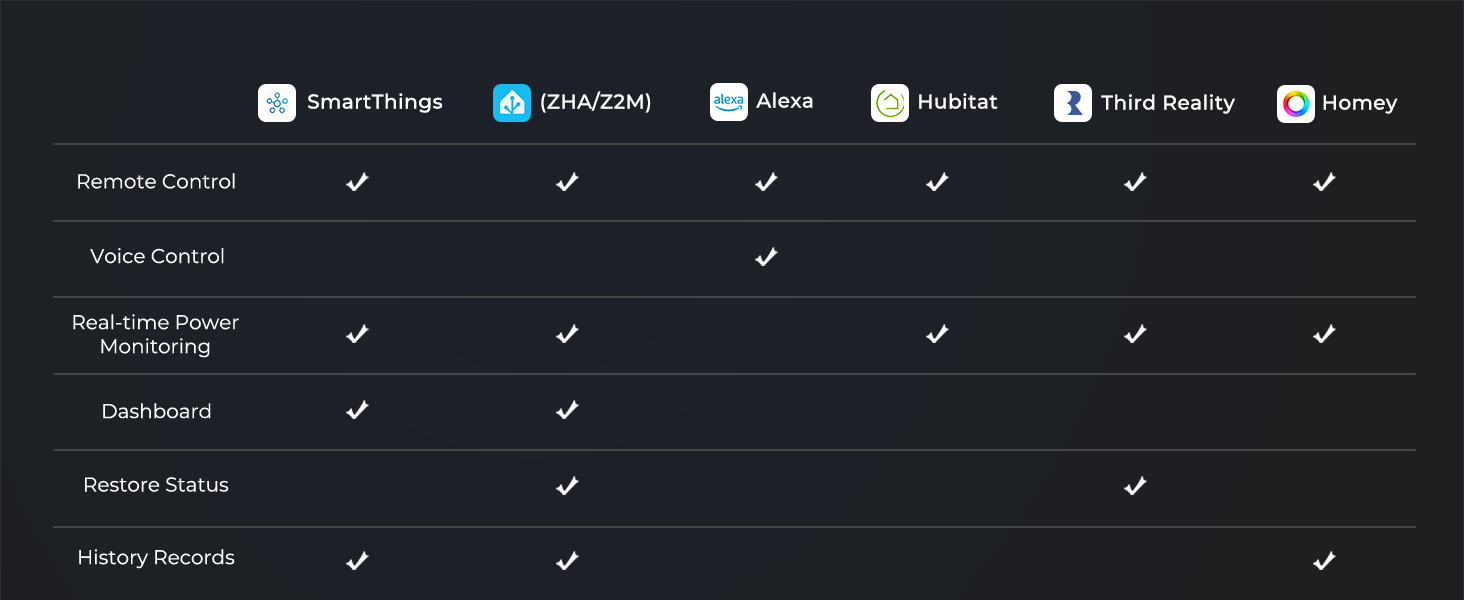
 Energy Monitoring & Dashboard
In SmartThings App, you can see the energy cost, history and dashboard, then create routines.
 Energy Monitoring & Dashboard on ZHA and Z2M
Restore status available on ZHA & Z2M, it means user can customize on/off status after power-on.
 Remote Control and Real-time Energy Monitoring
In Hubitat, you can remote control the smart plug and see the real-time energy cost.
 Real-time Monitoring, Total Consumption, History
Third Reality supports remote control, total consumption,real-time power monitor and restore status.
1 Over view
2 SmartThings
3 Home Assistant
4 Hubitat
5 Third Reality
More Application Scenarios 
Zigbee Repeater 
Third Reality Smart Plug uses Zigbee Low Energy Mesh wireless technology which allows for a farther reach, enabling whole-home installations. Each one serves as a signal repeater, even if a smart plug is out of reach from the Alexa Echo device, it can still be controlled using the Mesh network.
When the Smart Plug Gen2 paired with Hubitat hub, but can’t see current state and can’t control it in Hubitat?
Please change the device type to “Generic Zigbee Outlet” in Hubitat, then it should work properly.
What platfroms support energy monitoring?
You can see the energy monitoring dashboard in SmartThings and Home Assistant(Z2M/ZHA), create routines when the consumption is too high or too low.
Does it works as a Zigbee repeater?
Yes, it works as a ZigBee repeater, which is a very practical function that extends the signal range with mesh network.
What is the function of restore status? And which platforms are available?
Restore status means users can customize on/off state after power-on again, it is available on ThirdReality App and Home Assistant Zigbee 2 MQTT.
Why does my Smart Plug Gen2 show electricity usage even when nothing is plugged into it?
Even when nothing is plugged in, the Smart Plug itself uses a tiny bit of electricity—less than 1 watt—just for being turned on. We show this small amount on the display to make sure you’re fully aware of any power it uses.
Product Dimensions : 2.7 x 1.3 x 1.13 inches; 9.52 ounces
Item model number : 3RSP02028BZ
Date First Available : December 13, 2022
Manufacturer : Third Reality, Inc
ASIN : B0BPY5D1KC
Best Sellers Rank: #1,959 in Tools & Home Improvement (See Top 100 in Tools & Home Improvement) #20 in Electrical Outlet Switches
Customer Reviews: 4.5 4.5 out of 5 stars (1,320) var dpAcrHasRegisteredArcLinkClickAction; P.when(‘A’, ‘ready’).execute(function(A) { if (dpAcrHasRegisteredArcLinkClickAction !== true) { dpAcrHasRegisteredArcLinkClickAction = true; A.declarative( ‘acrLink-click-metrics’, ‘click’, { “allowLinkDefault”: true }, function (event) { if (window.ue) { ue.count(“acrLinkClickCount”, (ue.count(“acrLinkClickCount”) || 0) + 1); } } ); } }); P.when(‘A’, ‘cf’).execute(function(A) { A.declarative(‘acrStarsLink-click-metrics’, ‘click’, { “allowLinkDefault” : true }, function(event){ if(window.ue) { ue.count(“acrStarsLinkWithPopoverClickCount”, (ue.count(“acrStarsLinkWithPopoverClickCount”) || 0) + 1); } }); });
ZIGBEE 3.0 STANDARD: Works with compatible Zigbee hubs or Echo devices with Zigbee hub built-in. Such as Echo (4th Gen), Echo Plus (1st Gen and 2nd Gen), Echo Show 8 Gen3, Echo Show 10 (Gen2 and Gen3).Echo Studio, Eero 6, Eero Pro 6, Home Assistant, SmartThings 2015/2018, Aeotec, Hubitat, Homey Bridge, Homey Pro, Third Reality Hub Gen Plus and Third Reality Smart Bridge. Zigbee Hub Required.
EASY SETUP and COMPATIBLE DESIGN: Maximize efficiency and convenience with space-saving design that won’t occupy the adjacent socket. Super easy setup with Compatible Echo Devices, just plug the Smart Plug in the wall outlet and say “Alexa, discover my devices” , then it will automatically find the plug. Please get in touch with us when you meet any problems or need further support.
REAL-TIME ENERGY MONITORING: Monitor current consumption of your plug-in devices, effectively save energy and reduce waste. This function supported by Home Assistant, SmartThings, Hubitat and THIRDREALITY smart hub Gen2.
SAFETY SETTING: In order to ensure your home safety, we also realize the function of restoring status that means users can customize on/off state after powered on again. Currently THIRDREALITY Hub Gen2 and Home Assistant (ZHA and ZigBee2MQTT) support this function.
REMOTE CONTROL & VOICE CONTROL: Easily control your home appliances anytime, anywhere, no limited of time and distance. When Smart Plugs connect with compatible Amazon Alexa Echo Devices or other ZigBee hubs that can work with Alexa or Google Home, then you can free your hands, just delivering voice commands to turn on/off your plugs.
HOME AUTOMATION: Intelligent life starts with automatically turning on the coffee maker and toaster, enjoy a leisure breakfast. With more features, you can place a mount of plugs in one group, so that you can control all the plugs in the group with one click.
9 reviews for THIRDREALITY ZigBee Smart Plug 4 Pack with Real-time Energy Monitoring,15A Outlet, Zigbee Repeater,ETL Certified,ZigBee Hub Required,Work with Home Assistant,Compatible Echo Devices and SmartThings




dirtyplates –
Good reliable Zigbee Smart Plugs I have
Great device, affordable price, and pretty consistent so far. All 4 of them paired with no problem via ZHA on Home Assistant. They also have been a good repeater to the furthest part of the house and all reading good LQI. Energy Monitoring was nice touch although I had less intention of relying on this feature at first, which eventually became helpful in automating some of the small appliances I wanted to test out to start with. I had not had a plan on plugging in heavy load items while it says it’s 15A to be safe. But connectivity standpoint, size, the data that can bring back for my dashboard for monitoring have been pretty reliable. Love the Firmware update OTA. Definitely a good solid option of ZigBee Smart Plug.
Steven –
Works Perfectly with My Smart Setup
These smart plugs have been great so far. Home Assistant integration was a breeze! They also paired with my Echo hub in just a couple of minutes and have been totally reliable ever since. I use them for lamps and a coffee maker, and I like being able to track energy use and see what’s actually drawing power. The signal is strong too, acting like a repeater that keeps everything connected around the house. For a set of four, the price feels fair, and setup couldn’t have been easier.
TheAppleFreak –
Both the power monitoring and non power monitoring versions work perfectly within Home Assistant
I have a total of six of these plugs now (4 basic, two with power monitoring) in my home. To be brief, I’m very satisfied with these so far.The four basic plugs act mostly as repeaters to help extend my mesh from my Home Assistant Pi in the front of the house to the boiler room in the back of the house (one floor down in the basement). With one plug in each room, with various amounts of obstructions between them, each maintains healthy LQIs to each other and to the sensors connected to them (above 60 in all cases, reaching 150 when they have an unobstructed LOS in one case). Honestly I could probably remove a plug or two without impacting the network’s stability, but I’d rather have the peace of mind. One slight downside that I noticed was from one plug that had nothing plugged into it; if the plug was on but there was no load, it would make a buzzing noise. Turning it off stopped the noise, so I did that. I’m not sure if this happens with a load plugged in.The two energy monitoring plugs are connected to our washing machine and gas dryer (which both use standard 120v power cables). Each plug measures the following values, as described in Home Assistant while using ZHA:- AC frequency (Hz)- Power/active power (W)- Power factor (%, may show as Unknown or not show up at all)- Current/RMS current (A)- Voltage/RMS voltage (V)- Summation delivered (kWh, which appears to be cumulative over time)The readings appear to be generally sensitive at the lower end of the scale. Both machines are registered as pulling 1-2W when off and about 4W at idle, which allowed me to set up a threshold helper in HA that lets me know when the machine is on or off. I think the update frequency is somewhere on the order of 15-30 seconds, but I’m not entirely sure. For my purposes, it’s more than fast enough.All plugs work perfectly when using ZHA. The pairing process was painless, all plugs support power on configuration, you can set up OTA firmware updates in ZHA with a config change, and it supports channel migration, so if you change your Zigbee network to use another channel they’ll automatically update without needing to re-pair.All in all I’m quite satisfied with all of these plugs, especially at their current prices of 4 basic for $30 and one power monitoring for $12.UPDATE 2024/1/10: I recently had to re-set up my Home Assistant install, and both of the power monitoring plugs I owned before no longer show the nonfunctional Power Factor stat. This might have been disabled at some point in the past on ZHA’s side, as the labels for each stat had been changed. I’ve updated the list above to reflect the new labels.Additionally, I picked up another power monitoring plug recently when they were on sale recently, and this new one has Power Factor both in the list and functioning. EDIT 2024/1/30: After some diagnostics, I’ve determined all three PM plugs are running the same firmware revision (0x10013048, or v72 if you convert the last three numbers from hex to decimal), but the older two don’t show the power factor. This suggests to me there might have been a minor hardware revision to reenable that properly, so if you’re looking to write automations or analytics that use it, be sure to check the plugs beforehand. Beyond that, all power monitoring plugs work identically.
Roy –
Evaluation of the THIRDREALITY Zigbee Smart Plug with Energy Monitoring
Title: An In-Depth Review of the THIRDREALITY Zigbee Smart Plug with Energy MonitoringIntroduction:The THIRDREALITY Zigbee Smart Plug with Energy Monitoring has emerged as a noteworthy component in my smart home ecosystem. With an array of impressive features, this review delves into its strengths and areas that warrant consideration.Positive Aspects:A highlight of the plug is its effortless integration with Zigbee hubs, exemplified by its seamless connection to my Zigbee hub. The plug’s compact design and diverse sensors, encompassing current (amps), power (watts), and power factor, offer a comprehensive insight into energy consumption. The flexibility to adjust measurement units within Home Assistant enhances the monitoring experience, providing personalized and insightful data.Uncovering voltage fluctuations in my 120V outlet was an unexpected yet invaluable discovery. This insight helped identify loose wiring issues, resulting in a stable 120V with minimal fluctuations—a testament to the plug’s preventative capabilities.Ease of Integration and Startup Behavior:Connecting the THIRDREALITY Smart Plug to Home Assistant using only ZHA was remarkably straightforward. The user-friendly design is evident in the uncomplicated process of initiating pairing mode, achieved by holding the button while powered on until the LED flashes. The plug’s compatibility with various Zigbee hubs ensures versatility in integration possibilities.A noteworthy feature, often overlooked, is the startup behavior. The plug offers the choice to dictate its state upon power restoration or when moved. Users can opt for the plug to start in the off position, on position, toggle between on and off, or resume its previous state. This level of customization adds a layer of convenience, tailoring the plug’s behavior to individual preferences and specific scenarios.Reliability Under Stress:A rigorous stress test showcased the plug’s resilience, enduring the simultaneous operation of a coffee maker and air fryer, drawing over 16 amps and 3,000 watts for a minute—well beyond its specified rating of <15V. This durability sets it apart from competing smart sockets prone to failure under similar conditions.Areas for Improvement:Despite its commendable features, the THIRDREALITY Smart Plug has room for enhancement. The slightly elevated price, especially during holiday promotions, raises concerns, as discovered through the Honey browser plugin. Such pricing fluctuations are questionable tactics and merit consideration.Additionally, the absence of robust customer support is a drawback, underscoring the importance of reliable channels for addressing queries or concerns.Furthermore, while the plug accommodates 15-amp outlets, users with 20-amp sockets may find limitations. Clarity on protective measures to prevent capacitor explosions and mitigate the risk of a house fire due to exceeding specified amperage would enhance the plug's safety credentials.In Conclusion:The THIRDREALITY Zigbee Smart Plug with Energy Monitoring impresses with its feature-rich design and resilience under stress. Prospective buyers should weigh its price point, consider the absence of robust customer support, and evaluate their specific amperage requirements. The addition of the startup behavior feature contributes to its versatility, allowing users to tailor the plug's behavior to their preferences and scenarios.Wrapping it up, whether there's a burst of positivity or a dash of negativity, some fresh revelations, or any overlooked gems, stay tuned! I'll be jazzing up my post with all the deets to keep you hooked and make it a must-read. Let the editing extravaganza begin!
Private –
Great device. I’ve got over a dozen of them running. Great for integration with Home Assistant through Hubitat, can monitor power usage, trigger actions based on the power usage, etc.
Luis P. –
Mi antena ZHA lo detectó casi de inmediato y el emparejamiento fue rápido, solo el firmware se tuvo que actualizar, y dos días después de instalarlo ha funcionado genialDa información también de electricidad en uso, recomendable
Nick –
These smart plugs do what they’re supposed to and do it well. I bought them to expand my Zigbee network, and they’ve worked flawlessly so far. Setup was smooth, and they’ve been stable in daily use.I use them with Zigbee2MQTT on Home Assistant, and integration was seamless. I love Third Reality products and have many of them across my smart home setup—they’re consistently reliable, affordable, and easy to work with. These plugs are no exception.
Amazon Customer –
Works great with Echo 4th generation
Yaser Almasri –
Son muy buenos y mas la versión de monitoreo de energía